Unlimited access to all our tools


How does it work?
Merge your PDF and Word documents in 3 simple steps:
- 1
Upload or drag and drop your PDF and Word files.
- 2
Rearrange files or remove any you don’t need.
- 3
Download your combined document as a single PDF.
With PDFAid, you can combine Word and PDF documents into a single file directly in your browser. Merge reports, contracts, and scanned attachments without losing formatting. Our tool works on any device with nothing to install, so all the related files end up in one document.
How to add a PDF to a Word document
Combining your documents takes only a few clicks in our online editor. You can quickly add a PDF to a Word doc without losing your formatting or retyping anything by hand. Our combiner lets you upload and convert up to 12 files at once, with a size limit of up to 100 MB per document.
Step 1: Import files into the tool
Drag and drop your files directly into the upload area to get started. You can also click the Upload to merge button to select files stored on your device. Our tool lets you combine PDF and Word Doc files in a single session. Once you add all your files, click Merge PDF to continue.
Step 2: Arrange your final document
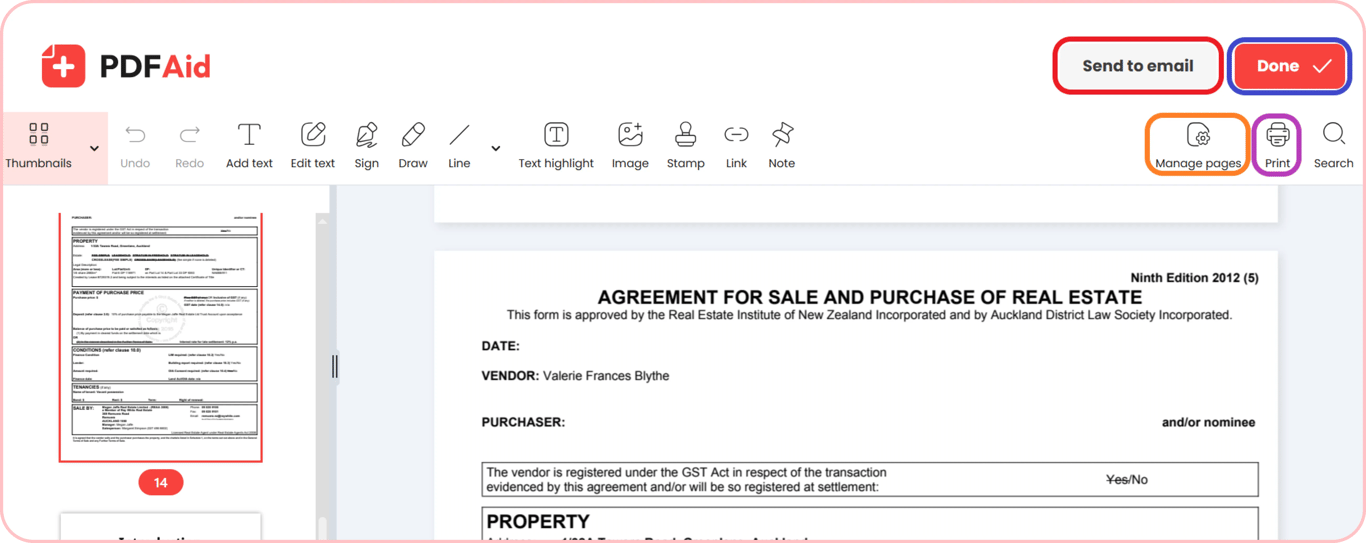
Customize your layout before you merge PDF to Word formats. If you want to change how your file is structured, click Manage Pages. You can rearrange the thumbnails of pages by dragging them, make copies of key sheets, insert extra pages, or get rid of pages you don't want. Click Done to download your file once the layout is set. You can also click Print to make a physical copy, or choose Send to Email to share the document directly with a client.
Step 3: Choose your output format
You need to pick the output format that works best for you to combine Word and PDF pages:
DOCX and DOC: Best for modifying text in Microsoft Word, adjusting layouts, and everyday word processing.
PDF: Ideal for documents that need to preserve formatting, official documents, and clean printing.
PPT and PPTX: Great for turning document pages into presentation slide decks.
XLSX and XLS: Perfect for organizing tables, numeric lists, and spreadsheet data.
JPG and PNG: Useful for converting pages into high-quality images for web use.
TXT: Good for plain, unformatted text that you can paste into notes.
Common use cases
Combining different file formats keeps all your related records in one organized document. Here are everyday situations where merging Word and PDF files saves you time:
A CV in Word and diplomas in PDF for one application
When applying for a job, recruiters often ask for your entire application as a single file. If your resume draft is in Word, while your university diplomas and certificates are in PDF format, you can use our tool and merge Word files to PDF. This keeps your workflow organized and easy for hiring managers to review.
A contract in Word with attachments that came as PDFs
Business contracts are often written in Word for easy editing, while exhibits and signed annexes are usually saved as PDFs. By putting all of these parts into one document, you can change clauses and look over attachments in the same window. When you finish your edits, you can merge Word to PDF to generate a secure final agreement for signing.
A visa or tender application with supporting documents
Applying for visas, grants, or tenders means pulling together multiple personal and legal records. You often need to combine a filled Word application form with passport scans, bank statements, and business licenses in PDF format. With our tool, you can add Word to PDF documents directly in your browser. This creates a complete submission package that meets official requirements without leaving out any pages.
Merge PDF and Word on any device
You can merge PDF and Word directly in your web browser on any computer, tablet, or smartphone. There is no need to download or install extra desktop software, mobile apps, or browser plugins.
If you work on a laptop at your desk or use your phone on the move, simply open our website and upload your files. The converter works reliably across Windows, macOS, Linux, iOS, and Android. This means you can merge documents on any screen, so you don't have to worry about device limits.
Your files stay private and secure
Every file is processed over encrypted connections when you merge files in our workspace. This protects your private information from people who shouldn't have access to it. Because your documents stay protected, only you can see them. No one else can read, share, or download your content.
Similar tools
Other tools that can help you organize and combine your files:
Merge PDF documents: Combine multiple PDF files into one document.
Merge Word documents: Combine several Word files into one editable document while preserving layouts and text styles.
Merge images: Group multiple pictures into a single, organized document.
 We’re sorry to hear that you want to cancel your subscription. If you no longer need our service, you can click Cancel plan in the Membership tab of your account. You can also contact us via live chat, at billing@pdfaid.com, or by calling +44 808 501 2541 for help with canceling your subscription.