Unlimited access to all our tools


How does it work?
Flatten your PDF in 3 simple steps:
- 1
Upload your PDF file.
- 2
Choose how you want it flattened.
- 3
Download your flattened file.
Make multi-layer and interactive files non-editable with our PDF flattener. You can make text, images, annotations, and form fields part of a page. No one else will be able to change them.
What does flatten PDF mean?
The meaning of PDF flattening is turning different interactive elements in a file, such as form fields, comments, signatures, and layers, into fixed ones. If you use a PDF flattening tool, they'll become part of a page, and there won't be a way to move, delete, or edit them. When you save your document, its appearance stays the same, but you can't make edits anymore.
How to flatten a PDF file
To process your file, use our tool in your browser:
Step 1. Click the Upload to flatten button or drag and drop your PDF.
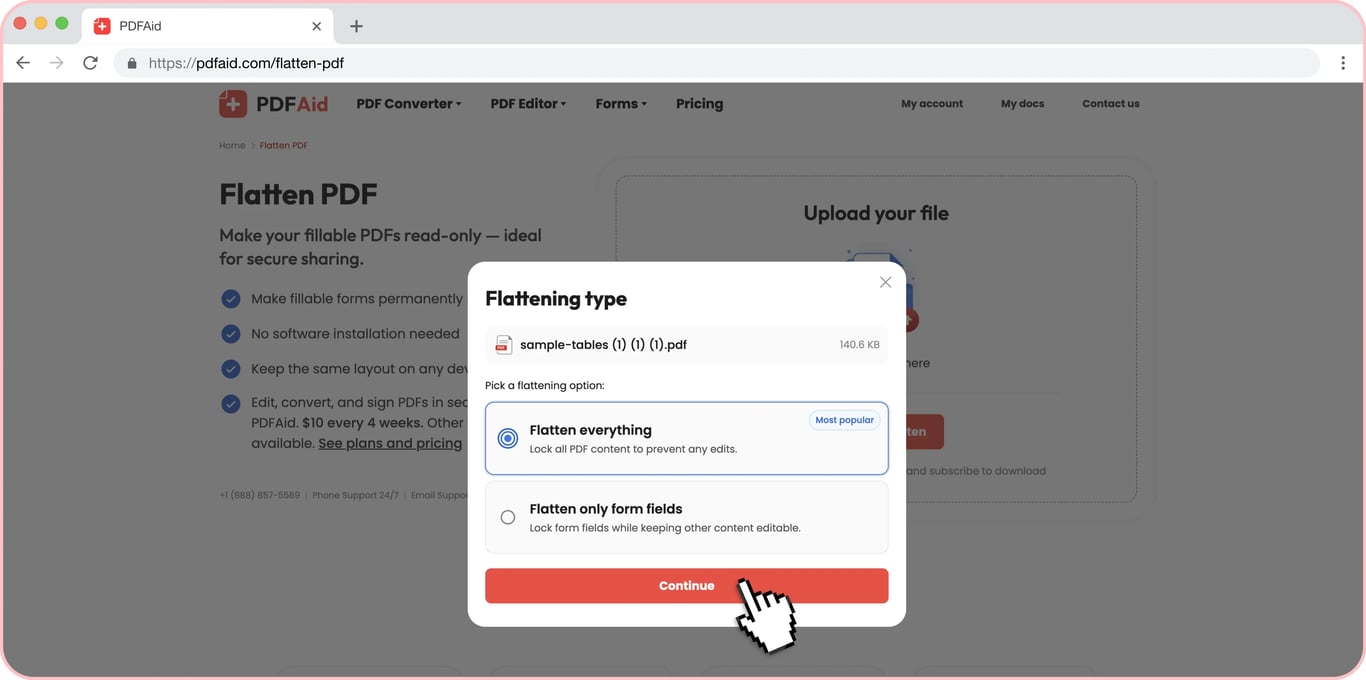
Step 2. Choose the option: you can flatten the entire file or only separate fields.
Step 3. Select a format, change a name if necessary, and save.
How to make a PDF read-only
If you want to restrict others from changing your file content, you should know how to make a PDF uneditable. Convert contracts, reports, applications, invoices, and other documents with our tool to make them read-only. Before flattening, you can fill form fields, add or change comments, and replace any element. After flattening, it looks like it's the same file, but all its parts are fixed.
Then, you can continue your work: send a document for approval, a ready-made form, or a file for printing. A recipient will open a file in a preset format and see the layout you prepared.
Flatten a fillable PDF form
If you don't want your information to go missing or change its position if a recipient opens it with another program, flattening is the right choice. It helps you make a PDF form read-only. After processing, your answers and signature will stay in your file, and the fields will disappear.
PDF flatten layers, comments, and annotations
Our service is a great solution if you need to flatten annotations and avoid losing essential remarks. This tool helps you keep reviewers' comments, highlighted spots, drawn marks, and graphic layers. If they turn into a fixed part of a page, your document won't be affected. It often happens because different viewers show notes differently, or a recipient can accidentally remove them with one click. So, flatten comments before sending your documents and preserve all elements by making them read-only.
Should I flatten a PDF before printing?
PDF flattening before printing can help you avoid unwanted elements on a physical document. If you process your file and make all details fixed, no surprises will occur, as it will look the same. A printer doesn't have to interpret all field forms, layers, or transparency, so if you want to see your file exactly as it is on your device, it's better to use this option. Without flattening, a printing program can add excessive details or fail to include everything on paper.
Flatten PDF on any device
There’s no need to install software because our tool is web-based. Even if it's a large file, you can flatten it on your Mac or iPhone. The mechanics are the same for both, so you can switch from computer to smartphone and enjoy a smooth workflow with your papers. Windows, Linux, Android — all major operating systems are good for managing your documents on our platform.
Your document keeps its original quality
Flattening doesn't mean affecting document quality. Fonts, images, layout, and resolution stay exactly as they were. The only change is that the content can no longer be edited. From fonts to layout and resolution, you'll discover that your document has exactly the look you intended. The only difference is that it's no longer editable.
Your files stay private and secure
You can access your files from your account. Other people can't view your materials or visit your account. We use encrypted connections so that your files are protected when you upload and work on them.
Similar tools
Apart from our flattening tool, you can also explore other useful services on this platform:
Fill PDF — make changes in your file and download it to any preferred device.
Sign PDF — complete your business or personal goals by signing contracts, forms, and applications.
Annotate PDF — include comments, highlight interesting details, or add shapes in a document.
Compress PDF — make a large-sized PDF smaller instantly.
 We’re sorry to hear that you want to cancel your subscription. If you no longer need our service, you can click Cancel plan in the Membership tab of your account. You can also contact us via live chat, at billing@pdfaid.com, or by calling +44 808 501 2541 for help with canceling your subscription.