Accès illimité à tous nos outils
 Fusionner un PDF
 Diviser un PDF
 Créer un modèle
 Compresser un PDF
 Modifier le PDF
 Add watermark
 Faire pivoter le PDF
 Signer le PDF
 Convertir le PDF en Word
 Convertir un document Word en PDF
 Convertir le PDF en JPG
 Convertir un JPG en PDF
 Convertir le PDF en Excel
 Convertir un document Excel en PDF
 Convertir le PDF en PowerPoint
 Convertir un fichier PowerPoint en PDF
Comment cela fonctionne-t-il ?
Téléversez votre image et supprimez le texte indésirablle en trois étapes simples :
- 1
Téléversez ou faites glisser et déposez votre image.
- 2
Utilisez l'outil pour sélectionner et supprimer le texte de l'image.
- 3
Téléchargez votre image modifiée.
Si vous avez une image ou une photo contenant des inscriptions indésirables, notre outil vous permet d’en supprimer le texte. Entièrement en ligne, il prend en charge plusieurs formats d’image, notamment JPG, JPEG et PNG : ouvrez-le directement dans votre navigateur, téléversez le fichier et effacez le texte inutile.
Comment supprimer du texte d’une image
Notre outil de suppression de texte d’image est rapide et pratique. Pour commencer, vous avez besoin d’une connexion Internet et d’une image au format pris en charge, d’une taille inférieure à 100 Mo, que vous souhaitez modifier. Suivez ensuite ces étapes :
Étape 1 : téléversez votre image
Sélectionnez le fichier à téléverser depuis votre appareil ou faites-le glisser dans la zone de téléversement. Notre outil vous permet de supprimer du texte d’une image, d’une photo, d’une numérisation ou d’une capture d’écran, tant que le fichier ne dépasse pas la limite de taille. Pour préserver une meilleure qualité, il est recommandé de téléverser le fichier d’origine plutôt qu’une copie compressée.
Étape 2 : sélectionnez le texte à supprimer
Sélectionnez dans le menu déroulant jusqu’à trois langues présentes dans votre fichier, puis attendez quelques secondes pendant que notre outil de suppression de texte d’image traite votre fichier et y détecte le texte. Dans l’éditeur, utilisez l’outil Modifier le texte pour supprimer les blocs de texte indésirables.
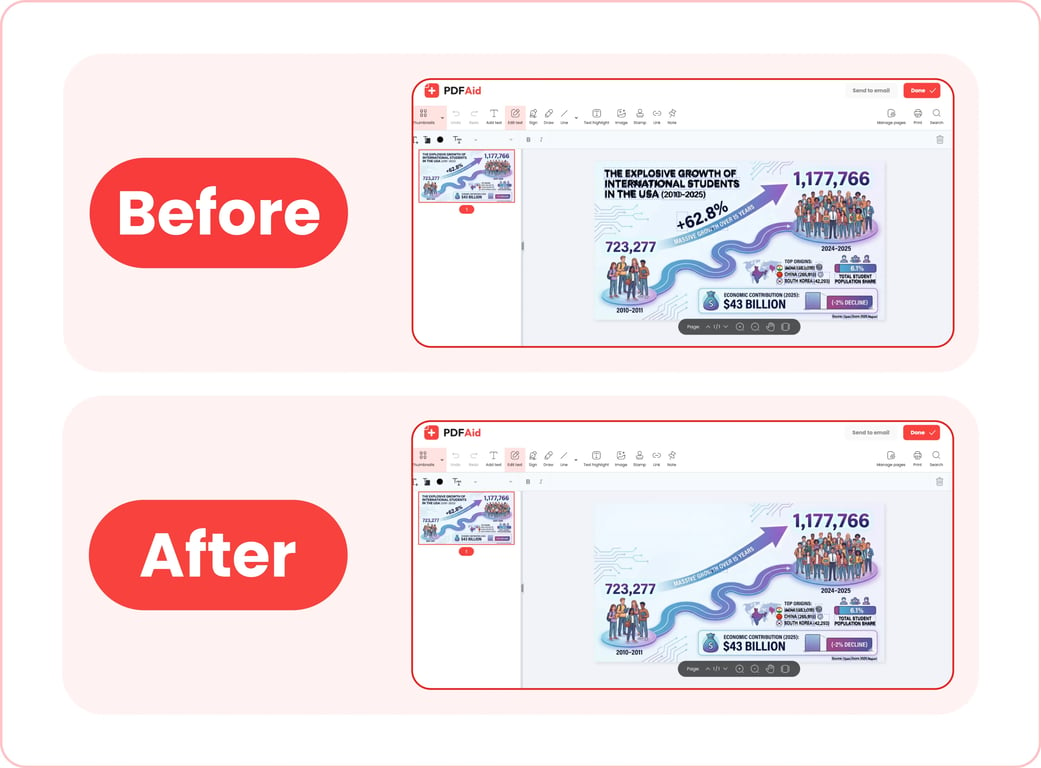
Étape 3 : enregistrez votre image
Lorsque vous avez terminé d’utiliser notre outil de suppression de texte d’image, cliquez sur Terminer pour enregistrer la nouvelle image sur votre appareil ou sur Envoyer par e-mail pour la partager par e-mail. Vous pouvez renommer votre fichier avant de le télécharger. Notre éditeur vous permet également de choisir l’un des formats de fichier pris en charge pour l’exportation : PDF, DOCX, DOC, PPT, PPTX, JPG, PNG, TXT, XLSX ou XLS.
Cas d’utilisation courants
Notre gomme pour effacer le texte des images et des photos peut être utile aux professionnels qui travaillent avec des documents numérisés, aux spécialistes du marketing et aux créateurs de contenu qui doivent supprimer des données sensibles de visuels, ainsi qu’à bien d’autres personnes. Voici quelques cas d’utilisation courants :
Une photo avec un timbre de date de l’appareil photo
Un problème fréquent : l’appareil photo a apposé la date dans un coin de la photo, mais vous ne souhaitez pas ou ne pouvez pas utiliser la photo telle quelle. Recadrer la photo pour supprimer le timbre implique de modifier ses dimensions et risque d’en altérer l’apparence. Avec notre outil de suppression de texte d’image, vous pouvez supprimer le timbre sans recadrer la photo. La modification est généralement invisible lorsque l’arrière-plan derrière le timbre est uniforme.
Une capture d’écran avec le vrai nom d’une personne
Lorsque vous rédigez un guide pratique pour un blog ou des instructions internes d’entreprise utilisant des captures d’écran à titre d’illustration, vous devez vous assurer qu’aucune donnée sensible réelle n’apparaît dans ces visuels. Grâce à notre outil, vous pouvez rapidement supprimer le texte d’une photo qui révèle autrement des informations personnelles.
Une publication enregistrée sur les réseaux sociaux avec des légendes incrustées
Si vous souhaitez enregistrer une photo provenant d’une publication ou d’une story sur les réseaux sociaux comportant une inscription, notre gomme vous permet de supprimer la légende et d’obtenir une photo nette. Vous pouvez l’utiliser pour supprimer du texte Snapchat d’une photo ou effacer les légendes de captures d’écran de stories Instagram.
Une note manuscrite sur un document numérisé
Vous numérisez un document contenant une note ou une marque manuscrite, mais vous avez en réalité besoin d’une copie nette. Habituellement, vous devriez supprimer ou masquer manuellement les marques indésirables, puis numériser à nouveau le document. Notre outil vous permet toutefois de supprimer du texte manuscrit des images sans devoir numériser à nouveau le document ni perdre davantage de temps. Nous vous conseillons d’enregistrer la numérisation d’origine avant d’essayer d’effacer quoi que ce soit.
Votre image conserve sa qualité d’origine
Lorsque vous effacez du texte d’une image avec notre outil, celui-ci ne compresse pas automatiquement le fichier d’origine et n’en modifie pas la qualité. Notre éditeur supprime uniquement les écritures ou le texte saisi inutiles : la mise en page, la résolution, les couleurs et tous les autres éléments restent inchangés. Voici quelques conseils pour obtenir un résultat net et de haute qualité :
Utilisez toujours le fichier d’origine sans le compresser avant de le téléverser dans notre outil.
Exportez votre image dans le même format que l’original.
Supprimer du texte d’une image sur n’importe quel appareil
Notre gomme de texte fonctionne entièrement en ligne. Vous n’avez pas besoin d’installer d’application ni de logiciel pour l’utiliser. Il vous suffit d’ouvrir notre plateforme dans votre navigateur et d’effectuer les tâches nécessaires. Vous pouvez ainsi utiliser notre outil sur n’importe quel appareil doté d’un navigateur et d’une connexion Internet : les étapes simples pour supprimer du texte d’une image sur un iPhone sont les mêmes que sur un ordinateur de bureau. La seule différence est que, sur un appareil mobile, vous pouvez choisir une image dans la photothèque ou les fichiers de votre appareil, ou prendre une photo instantanément.
Vos fichiers restent privés et sécurisés
Si vous devez supprimer du texte indésirable d’une photo privée ou d’une capture d’écran contenant des informations personnelles, notre outil vous permet de le faire en toute sécurité. Notre plateforme utilise des connexions chiffrées pour transférer et traiter vos fichiers. Après le traitement, les images que vous téléversez et modifiez restent accessibles uniquement dans votre compte personnel ; aucun tiers ne peut y accéder.
Outils similaires
Notre plateforme est une solution polyvalente pour différents besoins de gestion et de modification de fichiers. Elle propose plus de 50 outils pour modifier des PDF, convertir des fichiers vers et depuis différents formats, compresser des fichiers volumineux et bien plus encore. Si vous travaillez fréquemment avec des images contenant du texte, nous proposons 6 autres outils qui peuvent simplifier votre flux de travail :
Modifier le texte d’une image : modifiez la formulation ou corrigez les erreurs dans le texte existant sans installer de logiciel supplémentaire.
Ajouter du texte à une image : ajoutez des légendes personnalisées à toute image ou photo en quelques clics.
Convertir une image en texte : extrayez le texte brut d’une image ou d’une photo afin de le modifier ou de le réutiliser.
Traduire une image : traduisez des légendes de n’importe quelle langue vers n’importe quelle autre langue sans devoir reconcevoir l’image.
Ajouter une image à votre PDF : intégrez facilement des images dans des documents PDF.
Compresser une image : compressez de grandes images avant de les partager ou de les publier, sans perte de qualité.
 Nous sommes désolés d’apprendre que vous souhaitez résilier votre abonnement. Si vous n’avez plus besoin de notre service, vous pouvez cliquer sur « Annuler l’abonnement » dans l’onglet Abonnement de votre compte. Vous pouvez également nous contacter par chat en direct, à l’adresse billing@pdfaid.com, ou par téléphone au +44 808 501 2541, et nous pourrons vous aider à résilier votre abonnement.