Unlimited access to all our tools


How does it work?
Edit PDF text in the same font in 3 steps:
- 1
Upload your PDF file.
- 2
Click on the text you want to change, then edit it.
- 3
Download your edited PDF.
Edit a PDF and keep the same font, preserving the original layout. New text picks up the size, style, and spacing around it, so it reads as part of the document rather than something pasted in. Work with your PDFs in a browser without software installation.
How to edit a PDF with the same font
Here's how to use our PDF editor with font match:
Step 1. Drop your PDF into the upload area, or click the Upload file button to choose it from your device. The size requirement for files is no more than 100 MB. The tool allows one document at a time.
Step 2. Click Edit text, then select the words you want to change. If necessary, you can update text styles by choosing a different size, making phrases bold, underlining important information, or applying a different color. Delete the unnecessary or incorrect content from the document, but remember that you can't undo this action in case you're mistaken.
Step 3. Replace a word, date, or sum in the completed document without changing the rest of the content. Keep the paragraph's original look and formatting, including the text size, current font, and spacing.
Step 4. Press Done, select the preferred document format, and download or send the edited PDF to an email. The saved file will contain all the changes you made, and the new content will blend organically with the rest of the text.
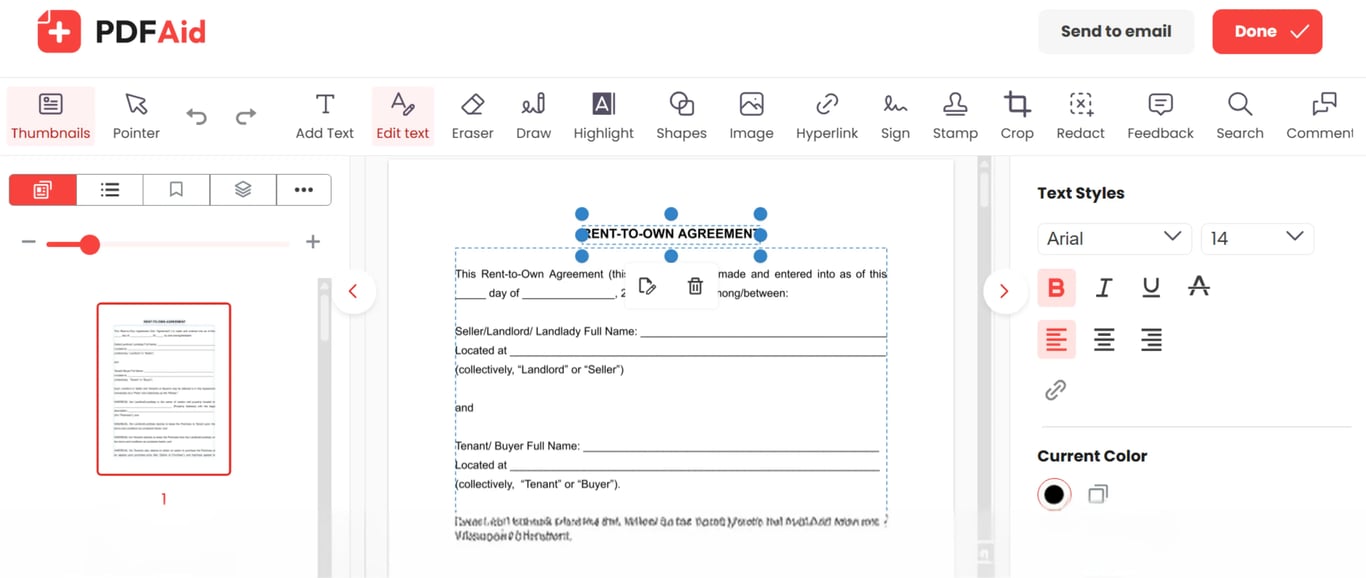
PDF editor with the same font on any device — Windows, Mac, iPhone, or Android
This tool is available online in your browser; no need to set up an app. Open it on a Mac, Windows or Linux computer, or a phone — the editor runs in the browser either way. Uploading, editing, and exporting work the same way on iPhone, iPad, and Android devices.
Your document keeps its original quality
When you edit a line, the font size, layout, images, and page breaks all stay where they were. The file looks exactly as it did, apart from the text you replaced. The tool won't affect the structure, so you won't have to redo your PDF.
Your files stay private and secure
Files are transferred over an encrypted connection. Your fillable form, contract, invoice, and all other documents remain accessible only to you. No other person can open, view, or edit them.
 We’re sorry to hear that you want to cancel your subscription. If you no longer need our service, you can click Cancel plan in the Membership tab of your account. You can also contact us via live chat, at billing@pdfaid.com, or by calling +44 808 501 2541 for help with canceling your subscription.