Get the most current DS-11 form now and subscribe to download
Form DS-11 is the official U.S. passport application. You must use it if you are applying for your first passport, or if you are a child under 16. Our online editor provides an editable template so you can easily fill out, update, and save your details in your browser. Once you finish, you can instantly download and print the form.
What is Form DS-11 (U.S. passport application)
Form DS-11 is the official document you must use to apply for a U.S. passport. The U.S. Department of State issues this form. Fill out the template on our platform, but do not sign the printed document until a passport agent instructs you to do so.
Field | Official Name |
|---|---|
Details | Application for a U.S. Passport |
Field | Form Identifier |
|---|---|
Details | DS-11 |
Field | Current Revision |
|---|---|
Details | 04-2025 (Active for 2026) |
Field | Issuing Agency |
|---|---|
Details | U.S. Department of State |
Field | Primary Uses |
|---|---|
Details | First-time adult passports, children under 16, and replacing lost, stolen, or damaged passports |
Field | Submission Method |
|---|---|
Details | In person |
Purpose of DS-11 and who files first time
You must use Form DS-11 to submit a first-time passport application or a new adult passport application in person.
You must file Form DS-11 in the following scenarios:
You have never owned a U.S. passport.
Your previous passport was lost or stolen.
Your old passport is severely damaged.
Your current passport was issued before you turned 16.
Your last passport was issued more than 15 years ago.
You cannot renew your passport by mail if you do not meet the strict State Department renewal criteria.
DS-11 for minors and children
Every minor under the age of 16 must use Form DS-11. To prevent international custody disputes, the government requires both parents or legal guardians to go to the passport agency with the child. If one parent cannot attend the appointment, they must fill out and notarize Form DS-3053 ahead of time. For the same reason, children cannot renew mail-in.
Requirements for a child passport application:
The child must appear in person with both parents or legal guardians.
You must prove the child's U.S. citizenship.
You must provide official documents that prove your parental relationship.
If one parent cannot attend, bring a notarized Form DS-3053.
Documents and requirements for filing DS-11
You must bring physical paperwork to your in-person appointment. You need for a passport application:
Proof of U.S. Citizenship: A certified birth certificate, a certificate of naturalization, or a previous undamaged passport.
Primary Photo Identification: A valid government-issued ID, like a driver's license or military ID.
Photocopies: A physical photocopy of the citizenship document and the front and back of your photo ID.
Passport Photo: One color photo that meets all official sizing and background guidelines.
Form DS-11: Fill out the template on our platform, but do not sign it yet.
Payment: The correct execution and application fees.
Additional supporting documents (if applicable): marriage certificate, court order for name change, parental consent (DS-3053), adoption records.
This checklist covers all the passport application required documents you must hand over.
DS-11 form fields and sections
Form DS-11 contains several blocks to organize records:
Personal Details: Your full legal name, date of birth, birthplace, and Social Security Number.
Contact Information: Your physical mailing address, phone number, and email.
Family details: Information about your parents and your marital history.
Employment Details: Your current job, which you write in the occupation on the passport application field.
Physical Characteristics: Your height, hair, and eye color.
Emergency Contact: Contact details for a trusted person.
Official Sections: Areas reserved strictly for the passport acceptance agent. Leave these completely blank.
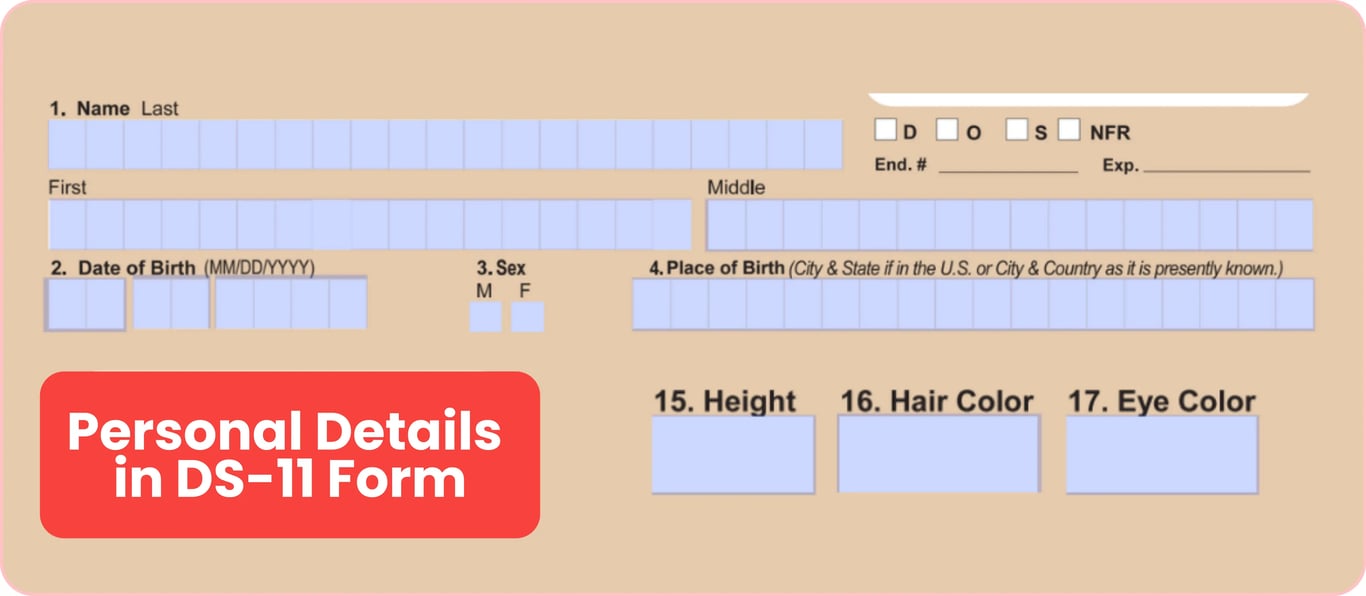
Personal details: height, hair color, date of birth
Provide accurate physical characteristics on the second page of the form. Make sure your entries reflect your current appearance.
Field | Date of Birth |
|---|---|
How to Complete It | Enter your birth date using the MM/DD/YYYY format. |
Field | Place of Birth |
|---|---|
How to Complete It | Write the city and state if you were born in the U.S., or the city and country if you were born abroad. |
Field | Height |
|---|---|
How to Complete It | Enter your height on passport application forms in feet and inches. |
Field | Child/Infant Height |
|---|---|
How to Complete It | For young applicants, write their current baby's height in feet and inches. |
Field | Hair Color |
|---|---|
How to Complete It | List your natural hair color. If you dye your hair permanently, write the color you wear most often. |
Field | Eye Color |
|---|---|
How to Complete It | Select your natural eye color. Do not list temporary contact lens colors. |
Special fields: DOS NFR, file search, emergency contact
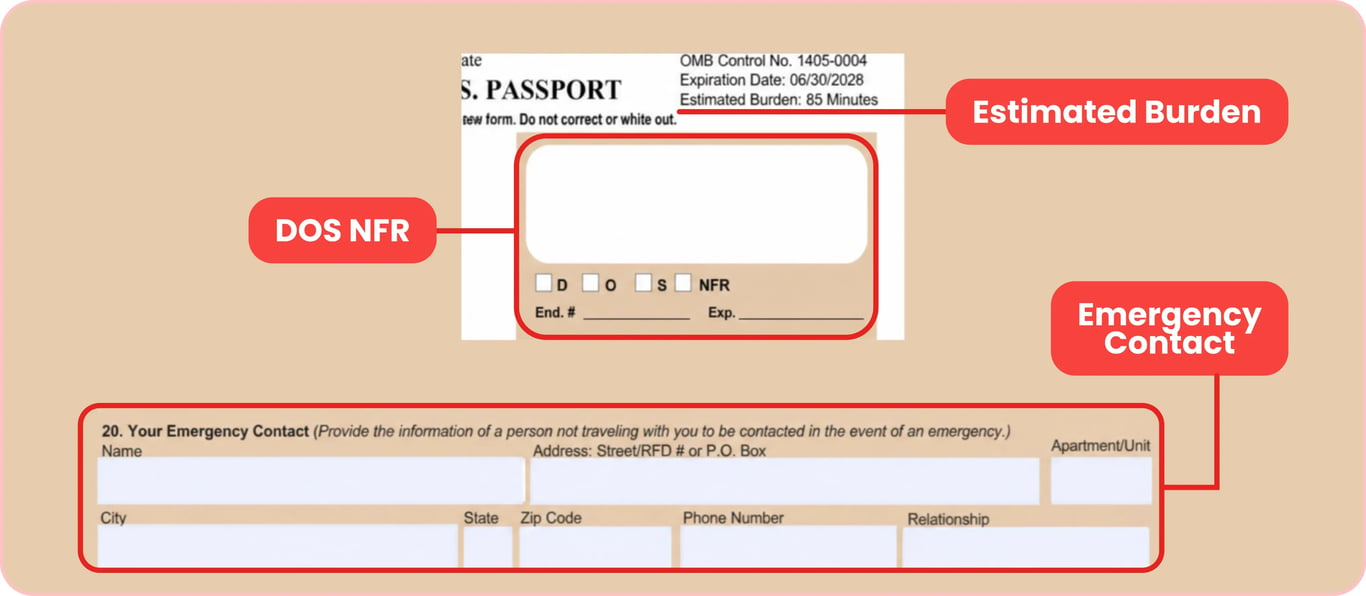
The first page of the DS-11 form features several administrative boxes that can seem confusing. Use this quick guide to understand them:
1. What is DOS NFR on passport application forms?
DOS NFR stands for Department of State, No Fee Regular. This is an internal administrative box. The government uses it for official, military, or diplomatic passports that do not require standard fees. Standard applicants should leave this field blank.
2. What is a file search on passport application documents?
This service is an optional paid service you can request if you are unable to find your birth certificate or proof of citizenship. The Department of State will search its historical records to verify your citizenship for an additional fee.
3. Is a passport application's emergency contact mandatory?
Yes, you must complete this section. List the name, phone number, address, and relationship of a person who is not traveling with you. The government uses this data in emergencies.
4. What is the estimated burden on passport application pages?
This is an official Paperwork Reduction Act statement printed on the form. It estimates that reading instructions and filling out the form takes an average of 85 minutes. This does not affect your application.
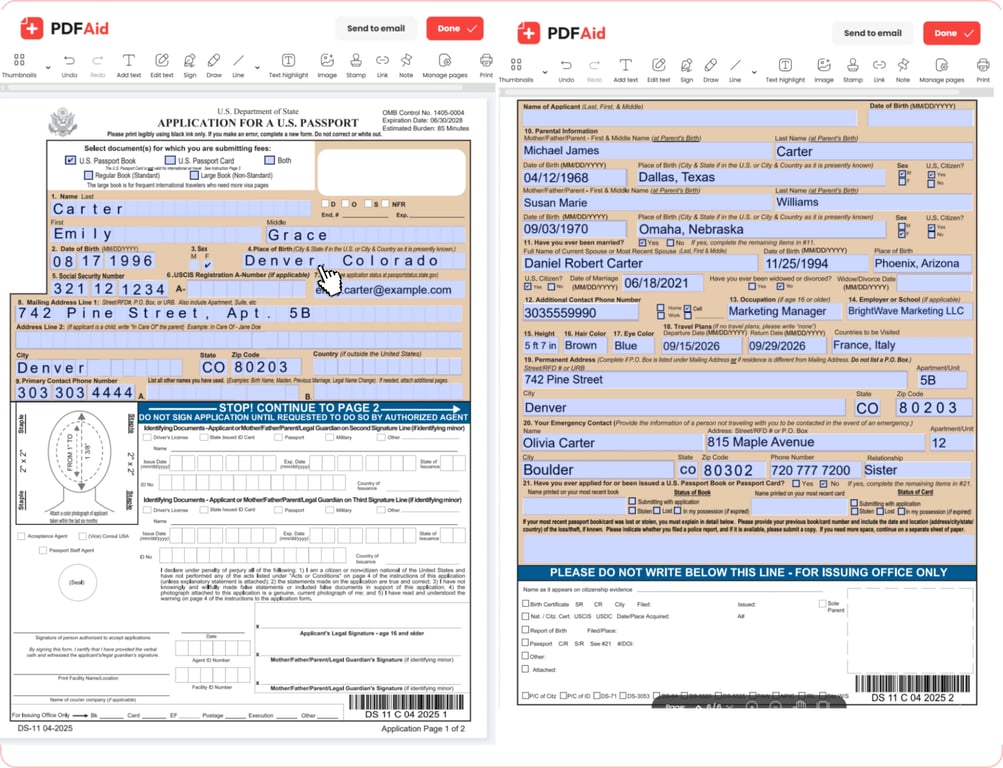
How to fill out a passport application (Form DS-11)
It’s faster to fill in your paperwork online than to write by hand. Open the form in your web browser and fill it out in the fields of interest. This avoids spelling mistakes and messy handwriting. Check your answers and save a draft to print. The online editor makes it easy to produce a clean, legible application to bring to your appointment.
Step-by-step guide to filling out DS-11
Our online process makes filling out passport application forms simple:
1. Open the fillable form in our online editor.
2. Choose your passport product.
Select the top boxes to choose a passport book, card, or both. For more pages, choose a large book.
3. Enter identity details.
Type your full legal name, date of birth, and Social Security Number. Then, complete the sections for your parents' details and your marital history.
4. Add your contact and physical information.
Enter your phone number, address, and physical description (height, eye color, and hair color).
5. Complete the emergency contact section.
Provide the name, address, and phone number of a trusted person.
6. Enter your previous passport history.
Answer if you've had a U.S. passport book or card. If you lost a passport, enter those details.
7. Review the document for mistakes.
8. Download and print the file.
Save the document as a PDF. Print the pages on standard letter-size paper.
9. Keep the signature field blank.
Leave the signature line blank and sign the form by hand in front of the passport acceptance agent.
Example of a completed DS-11 form
Formatting: ink color, printing, filling by hand
To submit your Form DS-11, you must follow formatting rules set by the Department of State:
Ink Color: If you choose to handwrite your details, use black color ink only.
Handwriting: Write clearly in neat block letters and do not write in cursive.
One-Sided Printing: Always print your application pages on separate sheets of paper. The government will reject double-sided documents.
Page Layout: Do not change the page size.
Correcting mistakes on the passport application
Making a mistake on passport application forms is common, but you must handle errors carefully. Automated government scanners read these documents, so your pages must be perfectly clean.
Situation | You find a typo in your online draft before printing. |
|---|---|
Action | Fix the typo directly in our online editor, then download and print the fresh document. |
Situation | You notice a mistake on your printed paper page. |
|---|---|
Action | You cannot use white-out, erase, or cross out mistake entries. Print new pages and enter details again, or fill out a new passport correction application form in our editor. |
Situation | You make a physical mistake while filling out the form by hand. |
|---|---|
Action | Discard the page and start over. The government rejects any pages with handwritten corrections. |
Situation | You discover an error during your in-person appointment. |
|---|---|
Action | Tell the passport acceptance agent. They'll tell you if the mistake is minor or if you need to fill out a new form. |
Signing Form DS-11
Your physical signature on Form DS-11 is a legal declaration. Under penalty of perjury, you certify that details on the form are accurate. The most critical rule for this application is that you must never sign it in advance. Keep the document unsigned until talking to an authorized passport acceptance agent.
When and where to sign DS-11 (don't sign in advance)
Follow these rules to avoid having your application rejected at your appointment:
At your passport appointment, bring your completed paperwork as an unsigned DS-11 form.
Wait for the passport acceptance agent to review documents and administer the oath.
Sign the page when the agent says so.
Handwrite your name in the signature box with black ink.
If you forgot to sign during preparation, don't worry. Complete this step at the desk with the agent.
If you signed early, print and fill out a new form before your appointment.
Warning: Do not sign Form DS-11 in advance. Your signature must be made only in the presence of an authorized acceptance agent.
Signing for a child: parental consent
Both parents or legal guardians must consent to a minor's passport. If the child's father or mother cannot attend the in-person appointment, you must submit extra proof.
Standard consent: Both parents come with their child and sign the application.
One parent absent: The absent parent must sign Form DS-3053 and submit it with a copy of their photo ID.
If a parent refuses to sign or cannot be reached, the applying parent must complete and submit Form DS-5525 to explain the situation.
Teens (ages 16 and 17): If at least one parent is aware of the application, teens can sign the form.
Where to get the DS-11 form and where to apply
Download a blank passport application form or use our online tool to fill out the document. However, you must submit the document in person. You cannot mail or submit a first-time application online.
Download and print the DS-11 form (PDF)
You can download a printable version and fill it out by hand. Always download the official passport application form PDF directly from the Department of State or our platform to make sure you have the latest version.
When printing your DS-11 form, follow these tips:
Print one-sided.
Use white, standard letter-size paper.
Do not shrink the size of the document.
Fill out DS-11 online
Go through the process of online passport application and make sure you do not leave any fields blank. You can save your progress, make edits, and export the document as a PDF that is ready to print.
Where to apply in person: acceptance facility, post office, appointment
Form DS-11 must be filed in person at an authorized acceptance facility. The passport agent must check your original documents, verify your identity, and witness your signature.
You can apply at these locations:
Post office: Usually, you need to book your appointment before you go there.
Public libraries: Staff in some local libraries are licensed to accept forms.
Government offices: County courts, clerk offices, and municipal buildings often accept applications.
Use the official State Department Passport Acceptance Facility Locator to find an acceptance facility near you. This tool shows local operating hours and whether you need to schedule an appointment in advance.
Get the most current DS-11 Application for a U.S. Passport form now
Up-to-date • Fillable • Ready to sign online