Korlátlan hozzáférés az összes eszközünkhöz
 PDF egyesítése
 PDF felosztása
 Sablon létrehozása
 PDF tömörítése
 PDF szerkesztése
 Vízjel hozzáadása
 PDF elforgatása
 PDF aláírása
 Konvertálás PDF-ből Wordbe
 Konvertálás Wordből PDF-be
 Konvertálás PDF-ből JPG-be
 Konvertálás JPG-ből PDF-be
 Konvertálás PDF-ből Excelbe
 Konvertálás Excelből PDF-be
 Konvertálás PDF-ből PowerPointba
 Konvertálás PowerPointból PDF-be
Hogyan működik?
Töltse fel a képét és távolítsa el a nem kívánt szöveget 3 egyszerű lépésben:
- 1
Töltse fel, vagy húzza ide a képét.
- 2
Az eszköz használatával válassza ki és törölje ki a szöveget a képről.
- 3
Töltse le a frissített képet.
Ha olyan képe vagy fényképe van, amely nem kívánt feliratokat tartalmaz, eszközünkkel eltávolíthatja a szöveget a képről. Az eszköz teljesen webalapú, és több képformátumot is támogat, többek között a JPG, JPEG és PNG formátumot – csak nyissa meg közvetlenül a böngészőjében, töltse fel a fájlt, és törölje a szükségtelen szöveget.
Szöveg eltávolítása képről
Képszöveg-eltávolító eszközünk gyorsan és kényelmesen használható. A kezdéshez internetkapcsolatra, valamint egy szerkeszteni kívánt, támogatott formátumú és 100 MB-nál kisebb képre van szüksége. Ezután kövesse az alábbi lépéseket:
1. lépés: Kép feltöltése
Válassza ki a feltölteni kívánt fájlt az eszközéről, vagy húzza át a feltöltési területre. Eszközünkkel képről, fényképről, beolvasott dokumentumról vagy képernyőképről is eltávolíthatja a szöveget, amennyiben a fájl nem haladja meg a méretkorlátot. A jobb minőség megőrzése érdekében javasolt az eredeti fájlt feltölteni tömörített másolat helyett.
2. lépés: Az eltávolítandó szöveg kiválasztása
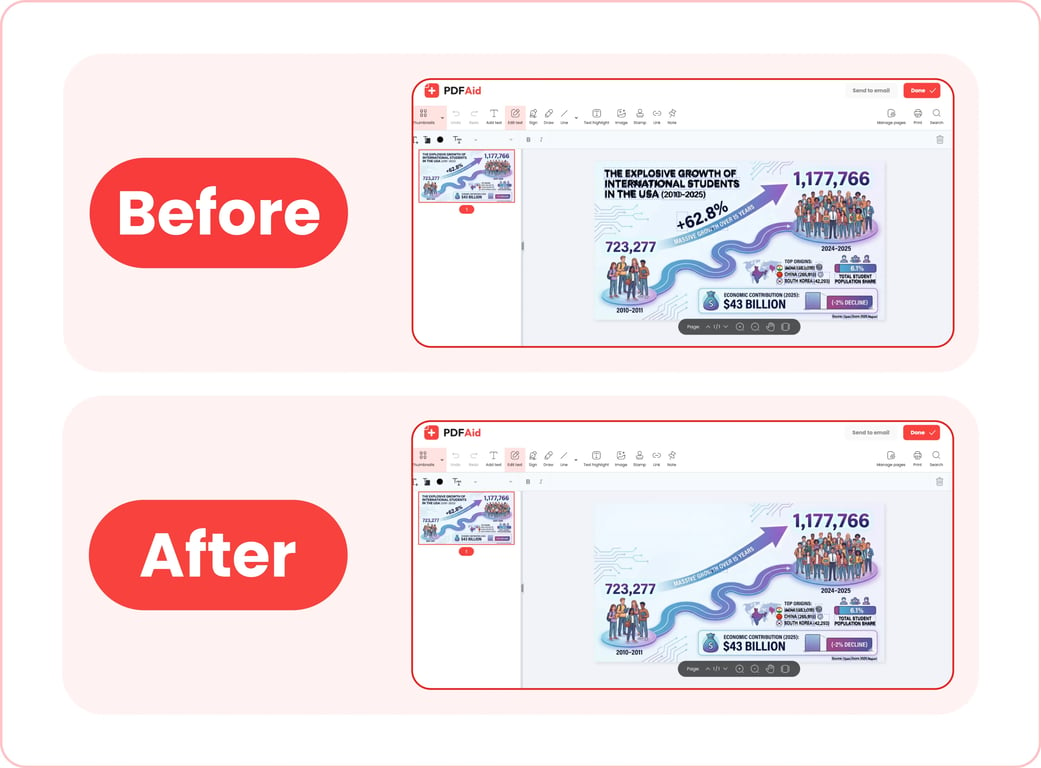
A legördülő menüből válasszon ki legfeljebb három, a fájlban szereplő nyelvet, majd várjon néhány másodpercet, amíg képszöveg-eltávolító eszközünk feldolgozza a fájlt és felismeri a benne található szöveget. A szerkesztőben a nem kívánt szövegblokkok eltávolításához használja a Szöveg szerkesztése eszközt.
3. lépés: Kép mentése
Miután befejezte a munkát képszöveg-eltávolító eszközünkkel, kattintson a Kész gombra az új kép eszközére mentéséhez, vagy az E-mailben küldés lehetőségre, ha e-mailben szeretné megosztani azt. Letöltés előtt átnevezheti a fájlt. Szerkesztőnkben az exportáláshoz a támogatott fájlformátumok egyikét is kiválaszthatja: PDF, DOCX, DOC, PPT, PPTX, JPG, PNG, TXT, XLSX vagy XLS.
Gyakori felhasználási esetek
Képekhez és fényképekhez készült szövegradírunk hasznos lehet dokumentumok beolvasott példányaival dolgozó szakemberek, marketingesek és olyan tartalomkészítők számára, akiknek el kell távolítaniuk a bizalmas adatokat a vizuális anyagokból, valamint sok más felhasználónak is. Íme néhány gyakori felhasználási eset:
Fénykép a fényképezőgép dátumbélyegzőjével
Gyakori probléma, hogy a fényképezőgép a dátumot a fénykép sarkába bélyegezte, Ön pedig nem szeretné vagy nem tudja így használni a képet. A bélyeg levágásához körül kellene vágnia a fényképet, ami megváltoztatja a méretét, és ronthatja a megjelenését. Képszöveg-eltávolító eszközünkkel vágás nélkül megszabadulhat a bélyegtől. A szerkesztés általában láthatatlan, ha a bélyeg mögötti háttér egységes.
Képernyőkép valakinek a valódi nevével
Amikor bloghoz készít útmutatót, vagy képernyőképeket szemléltetésként használó belső vállalati utasításokat ír, fontos gondoskodnia arról, hogy az ilyen vizuális anyagokon ne jelenjenek meg valódi, bizalmas adatok. Eszközünkkel gyorsan eltávolíthatja a fényképről az egyébként személyes adatokat felfedő szöveget.
Mentett közösségi bejegyzés beégetett feliratokkal
Ha el szeretne menteni egy közösségimédia-bejegyzésből vagy -történetből származó, felirattal ellátott fényképet, radírunkkal eltávolíthatja a feliratot, és tiszta fényképet kaphat. Ezzel eltávolíthatja a Snapchat szövegét egy fényképről, vagy törölheti az Instagram-történetekről készült képernyőképek feliratait.
Kézzel írt megjegyzés beolvasott dokumentumon
Beolvas egy kézzel írt megjegyzést vagy jelölést tartalmazó dokumentumot, de valójában tiszta példányra van szüksége. Hagyományosan a nem kívánt jelöléseket kézzel kellene eltávolítania vagy elfednie, majd újra beolvasnia a dokumentumot. Eszközünkkel azonban újrabeolvasás és időveszteség nélkül távolíthatja el a képekről az írott szöveget. Javasoljuk, hogy mielőtt bármit törölne, mentse el az eredeti beolvasott példányt.
A kép megőrzi eredeti minőségét
Amikor eszközünkkel töröl szöveget egy képről, az eredeti fájl nem tömörül automatikusan, és a minősége sem változik. Szerkesztőnk csak a szükségtelen kézzel írt vagy gépelt szöveget távolítja el – az elrendezés, a felbontás, a színek és minden más változatlan marad. Néhány tipp a tiszta, kiváló minőségű eredményhez:
Mindig az eredeti fájlt használja, és ne tömörítse azt, mielőtt feltöltené eszközünkbe.
A képet az eredetivel azonos formátumban exportálja.
Szöveg eltávolítása képről bármely eszközön
Szövegradírunk teljesen online működik. Használatához nem kell alkalmazásokat vagy szoftvert telepítenie. Csupán meg kell nyitnia platformunkat a böngészőjében, és elvégeznie a szükséges feladatokat. Ez azt jelenti, hogy eszközünket bármilyen böngészővel és internetkapcsolattal rendelkező eszközön használhatja – iPhone-on ugyanazokkal az egyszerű lépésekkel távolíthat el szöveget egy képről, mint asztali számítógépen. Az egyetlen különbség, hogy mobileszközön a készülék fotókönyvtárából vagy fájljai közül választhat képet, illetve azonnal készíthet is egy fényképet.
Fájljai privátak és biztonságban vannak
Ha nem kívánt szöveget kell kivágnia egy privát fényképről vagy személyes adatokat tartalmazó képernyőképről, eszközünk használata biztonságos megoldást nyújt. Platformunk titkosított kapcsolatokat használ a fájlok átviteléhez és feldolgozásához. Feldolgozás után a feltöltött és szerkesztett képek csak a személyes fiókjában maradnak elérhetők – harmadik felek nem férhetnek hozzájuk.
Hasonló eszközök
Platformunk sokoldalú megoldást kínál a különféle fájlkezelési és szerkesztési igényekhez. Több mint 50 eszközt tartalmaz PDF-ek szerkesztéséhez, fájlok különböző formátumok közötti konvertálásához, nagy fájlok tömörítéséhez és egyéb feladatokhoz. Ha gyakran dolgozik szöveget tartalmazó képekkel, további 6 eszközünk egyszerűsítheti a munkafolyamatát:
Szöveg szerkesztése képen: Módosítsa a szóhasználatot, vagy javítsa a meglévő szöveg hibáit további szoftver telepítése nélkül.
Szöveg hozzáadása képhez: Néhány kattintással egyéni feliratokat adhat bármely képhez vagy fényképhez.
Kép szöveggé alakítása: Egyszerű szöveget nyerhet ki egy képből vagy fényképből szerkesztéshez vagy újbóli felhasználáshoz.
Kép fordítása: Feliratokat fordíthat bármely nyelvről és bármely nyelvre anélkül, hogy újra kellene terveznie a képet.
Kép hozzáadása PDF-hez: Egyszerűen beágyazhat képeket PDF-dokumentumokba.
Kép tömörítése: Nagy képeket tömöríthet megosztás vagy közzététel előtt, minőségvesztés nélkül.
 Sajnálattal halljuk, hogy le kívánja mondani előfizetését. Ha már nincs szüksége szolgáltatásunkra, fiókjában a Tagság fülön az Előfizetés lemondása lehetőségre kattinthat. Előfizetése lemondásához élő csevegésen keresztül, a billing@pdfaid.com e-mail-címen vagy a +44 808 501 2541 telefonszámon is kérhet segítséget tőlünk.