Get the most current 8862 – Information to Claim Certain Credits After Disallowance form now and subscribe to download
Tax Form 8862 is an IRS document you need to file with your return to reclaim specific tax credits that were previously reduced or denied. You can quickly and easily fill out, edit, and sign this form in your browser with PDFAid. Handle your tax documents in our all-in-one workspace, without any extra software.
What Is Form 8862?
The meaning of Form 8862 lies in its role as an IRS recertification document you file with your tax return. You need it to reclaim specific tax credits that the IRS previously reduced or denied. The document shows the IRS that you meet all the requirements to get these benefits back. It helps prove eligibility when claiming refundable credits after disallowance, such as the EIC or ACTC, as well as several nonrefundable credits.
What Is Form 8862 Used For?
The primary purpose of the IRS Form 8862 is to restore your right to claim a credit after a previous denial. If you do not include it, the IRS system will automatically reject your second attempt.
For example, if the IRS removed your Earned Income Credit in the past, you cannot just claim it again normally. You must send this document along with your return to prove you qualify now.
This form covers four specific tax credits. Pay close attention because each credit has its own section. Leave other pages blank; just fill out the parts that apply to you. IRS rules actually require you to skip any sections you do not need.
Tax credit | Earned Income Credit (EIC / EITC) |
|---|---|
What it is and where to claim it | The Earned Income Credit is a refundable tax benefit that supports low to moderate-income workers. If you are reclaiming earned income tax credit, complete Part II of Form 8862. |
Tax credit | Child Tax Credit (CTC) and Additional Child Tax Credit (ACTC) |
|---|---|
What it is and where to claim it | These credits are designed for taxpayers who have dependent children. The Child Tax Credit reduces your tax liability, while the Additional Child Tax Credit is refundable. Completing the Form 8862 child tax credit section in Part III correctly gets your eligibility back. |
Tax credit | American Opportunity Tax Credit (AOTC) |
|---|---|
What it is and where to claim it | The American Opportunity Credit helps cover higher education costs. It applies to eligible students during their first four years of college. Fill out Form 8862, American Opportunity Credit Part IV, to claim this partially refundable credit. |
Tax credit | Credit for Other Dependents (ODC) |
|---|---|
What it is and where to claim it | This credit is nonrefundable, and it applies to dependents who do not qualify for the Child Tax Credit (older children or relatives you support). It is also included in Part III of Form 8862, together with CTC and ACTC. |
Who Needs to File Form 8862?
Form 8862 is required if the IRS previously reduced or denied your EIC, CTC, ACTC, ODC, or AOTC for a reason besides a math or clerical error.
You must file if:
Earned Income Credit was rejected after 1996;
Child Tax Credit, Additional Child Tax Credit, or Credit for Other Dependents was rejected after 2015;
The American Opportunity Tax Credit was disallowed after 2015;
You now qualify for the credit and want to claim it again.
You will usually learn about this requirement after receiving an IRS letter 8862. You might get Notice CP79, which tells you that your credit was denied and tells you how to get it back.
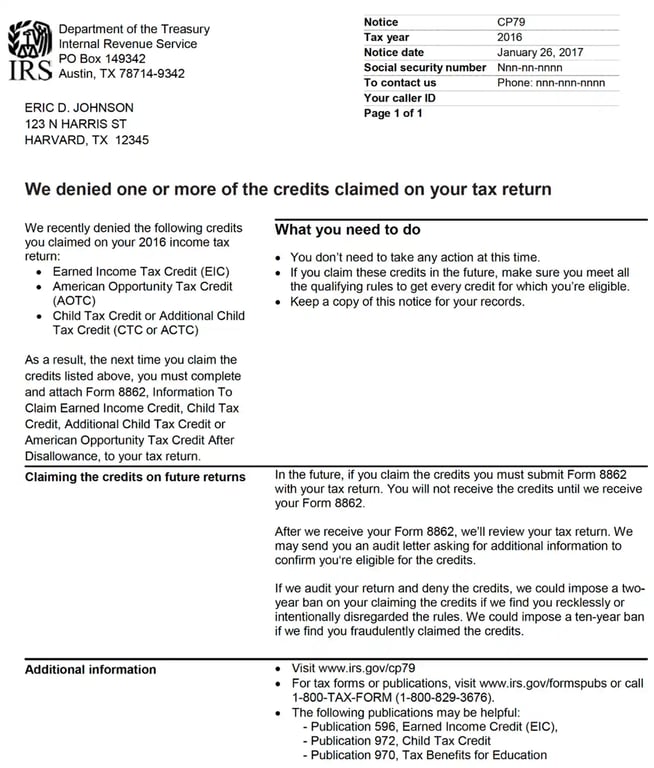
Source: IRS
When Form 8862 Is Not Required (and When a Ban Applies)
When It Is Not Needed |
|
|---|---|
Error vs. Disallowance |
|
When It Cannot Help |
|
To keep things clear, a disallowance means the IRS denied or reduced your credit because you did not qualify for it. A ban goes further by blocking you from claiming it for a specific period, regardless of eligibility.
Required Documents to Support Your Claim
You don't need to send supporting documents when you file Form 8862. Just keep them ready in case the IRS asks for proof.
The exact papers depend on the credit you want to reclaim.
For EIC and dependency-related credits
School, daycare, medical, adoption records;
lease agreements;
government correspondence;
residency documentation showing the child's address;
birth certificates;
proof of relationship.
For CTC, ACTC, and ODC:
dependency documentation;
Social Security records;
proof that the dependent meets residency and support requirements.
For AOTC
Form 1098-T;
tuition statements;
payment receipts;
enrollment records;
records of qualified educational expenses.
How to Fill Out Form 8862
To avoid mistakes, review the Form 8862 instructions before entering any information. The key requirement is that everyone must complete Part I before moving on to the specific credit section.
Here is how to fill out Form 8862 step by step:
Part I — All Filers (Lines 1 & 2)
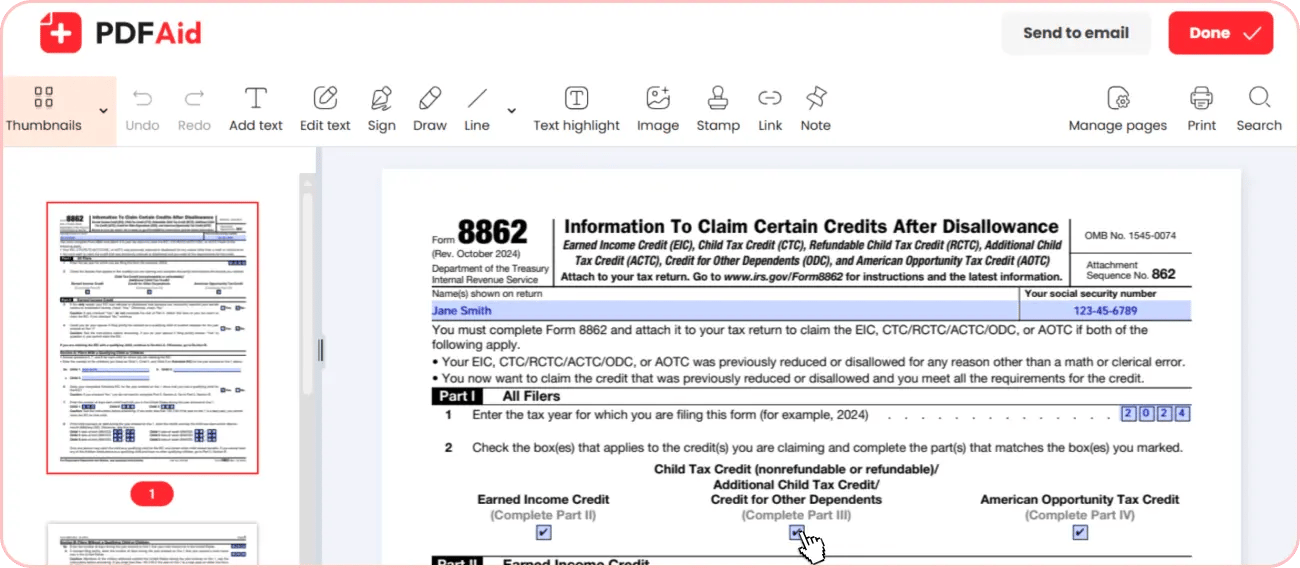
Every taxpayer must fill out Part I, regardless of which credit they want to restore. In this section, you enter the specific tax year you're currently claiming the credit for and check the box for the benefit you need to reinstate.
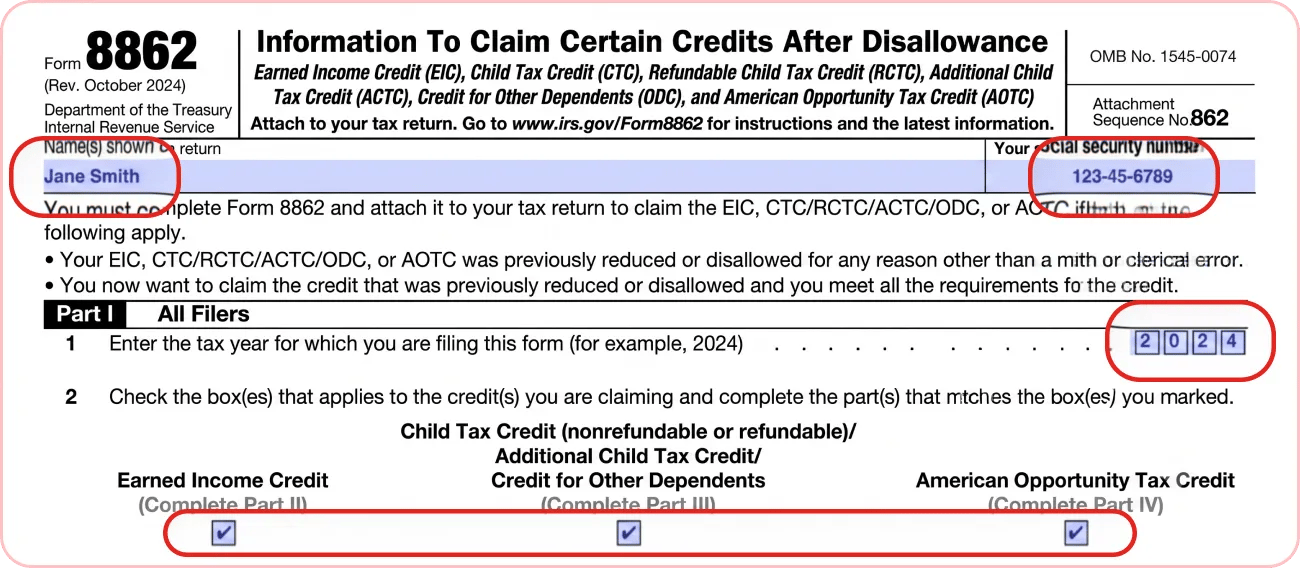
Part II — Earned Income Credit
You only fill out Part II if you're trying to recover the Earned Income Credit.
This part is divided into two separate sections based on whether you have a qualifying child. You only need to complete the single section that matches your home situation.
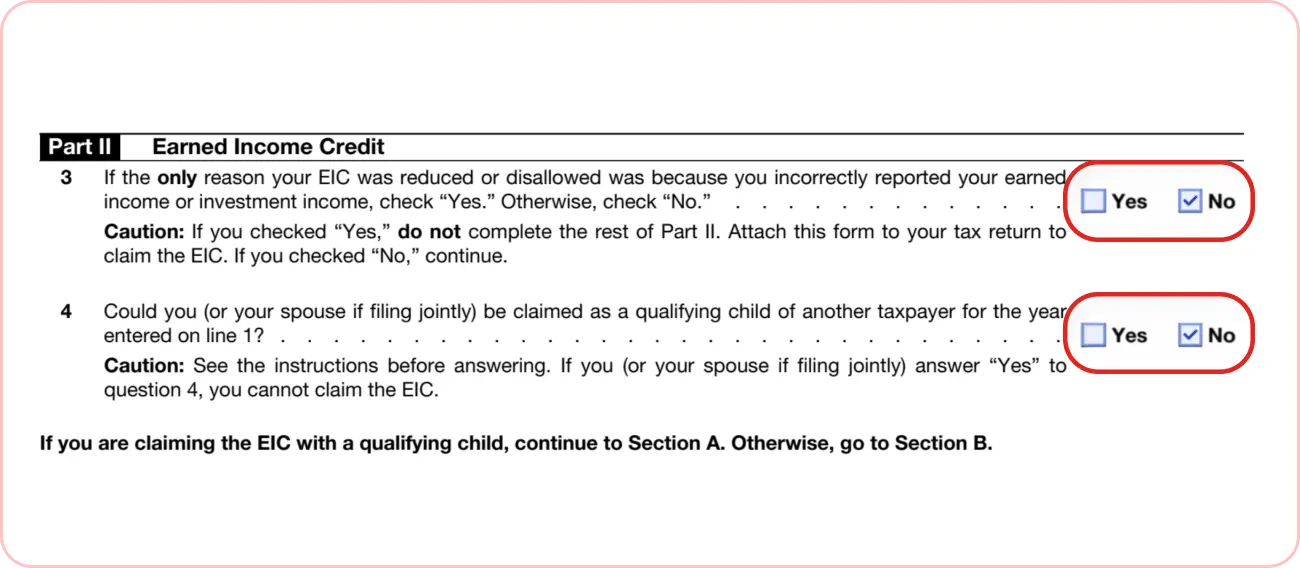
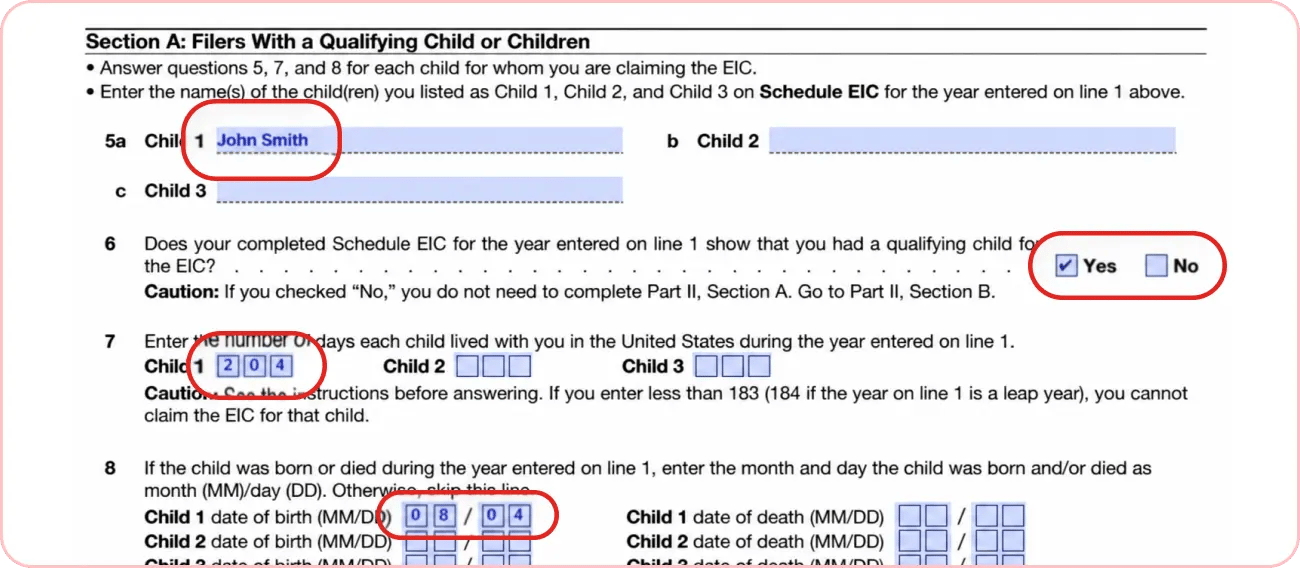
Section A: Filers With a Qualifying Child or Children
Use this section if you claim the EIC with children to confirm your exact relationship with them. You must also state how many months each child lived with you in the United States during the tax year.
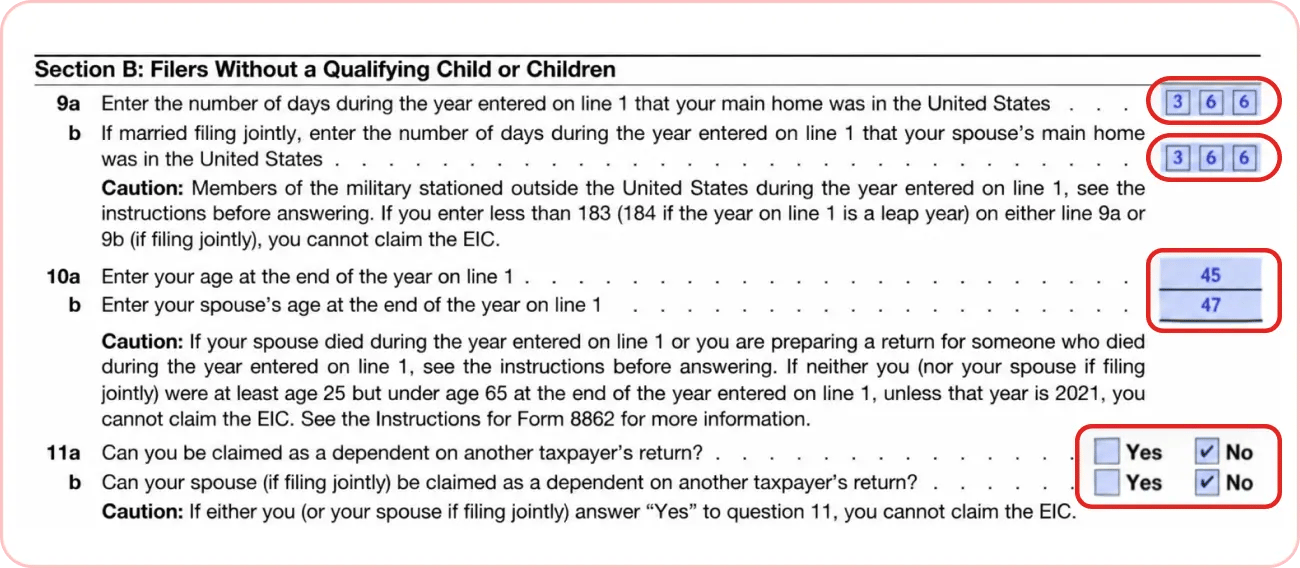
Section B: Filers Without a Qualifying Child or Children
Use this section if you claim the EIC alone. It confirms you meet the age rules and have lived in the US for more than half the year. It also verifies that nobody else can claim you (or your spouse, if filing jointly) as a dependent.
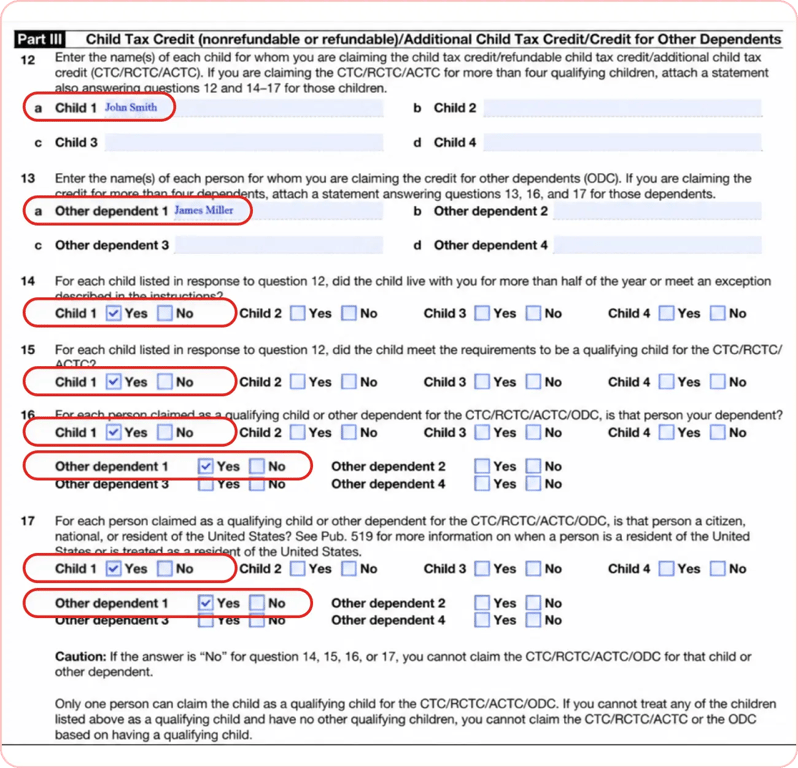
Part III — Child Tax Credit, ACTC, and Credit for Other Dependents
Fill out Part III if you're reclaiming the CTC, ACTC, or ODC. For each child or dependent, you must verify that they meet all IRS relationship, residency, and financial support rules. This section also confirms that no other taxpayer is trying to claim the same person on their return.
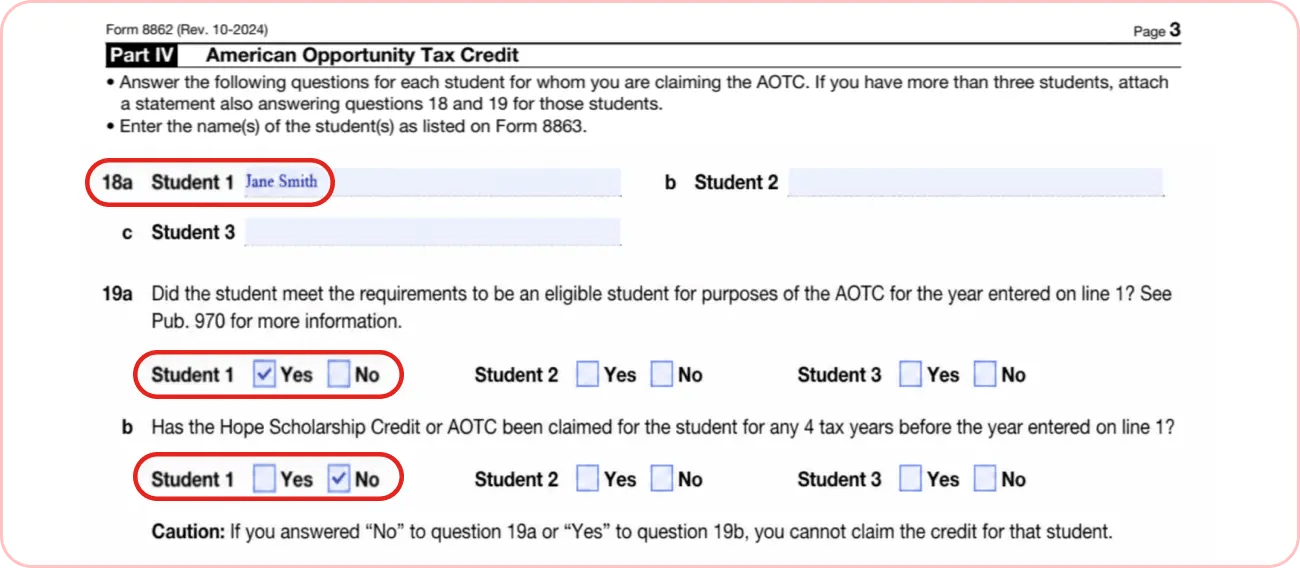
Part IV — American Opportunity Tax Credit
Complete Part IV if you want to restore your education credit. You must verify that the student met all eligibility rules, hasn't completed their first four years of higher education, and hasn't had the AOTC claimed for them for more than four tax years total.
How to Edit & Sign Form 8862 Online
Looking for how to get Form 8862 online? Edit, sign, and download a fillable Form 8862 directly in your browser.
Here is how you can manage the whole process in PDFAid:
Edit: Open the document. Fill in Part I, then complete only the sections that apply to your situation.
Sign: Use our tools to add your electronic signature.
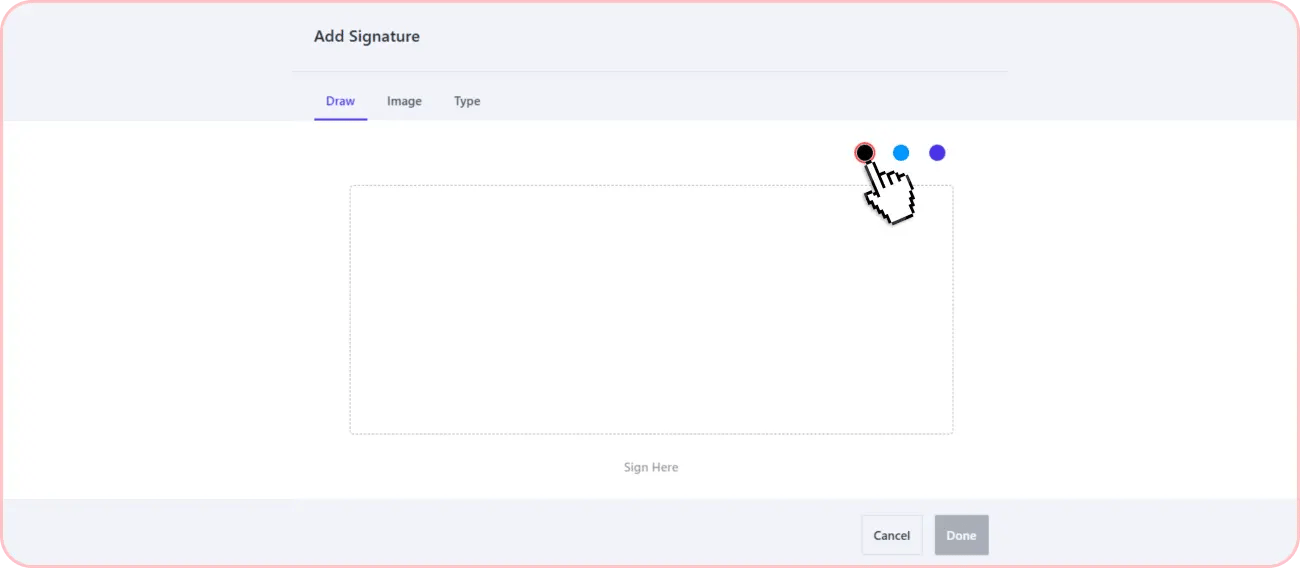
Send or download: PDFAid allows you to download a printable Form 8862 to your device in PDF and then upload it with your tax return.
How to File Form 8862
You should never file this document alone. It must always go together with your federal tax return, where you claim your credit. You can complete this process in two ways: electronically or by mail.
How to E-File Form 8862
If you choose to file online, the document becomes part of your electronic tax package. Here is how you can file Form 8862 electronically:
Complete your tax return using e-filing software.
Answer questions about tax credits you are claiming again.
The software automatically includes Form 8862 if it is required.
Review your return carefully before submission.
Submit your return electronically to the IRS.
Where to Send Form 8862 (by Mail)
You can also send the completed paperwork by mail using the correct IRS address for your state. Note that there is no IRS fax number for the 8862 Form, so it cannot be submitted by fax.
Filing Deadlines & Due Dates
There isn't a specific deadline for Form 8862. Its due date is completely tied to your federal tax return. You must submit it by the regular tax deadline, which is usually April 15. If you file for an extension, the form is due by your new extended date. If you're reclaiming credits on an amended return, you just need to send the form within the normal legal window for fixing past returns.
Key Due Dates to Remember:
Standard deadline: Usually April 15
Extended deadline: An additional 6 -month extension
Amended returns: Within 3 years of your filing date
Common Mistakes to Avoid
Filing the form when you don't need to. For example, a simple math or clerical error doesn't require it.
Filling out the wrong section or skipping parts you need for your specific credit.
Trying to use the form during an active 2-year or 10-year ban.
Entering information that doesn't match your tax return (SSN, dependents, income, or filing status).
Sending Form 8862 by itself. You must always attach it to your main tax return.
Forgetting to sign your tax return.
IRS Official resources
Get the most current 8862 – Information to Claim Certain Credits After Disallowance form now
Up-to-date • Fillable • Ready to sign online