Get the most current I-9 Employment Eligibility Verification form now and subscribe to download
Form I-9 is a required USCIS form to verify identity and work eligibility for U.S. hires. Our PDF editor lets you fill out, edit, and sign the printable template online. When finished, you can download or email your document.
What is an I-9 form
Form I-9 is a document used for employment eligibility verification. It is issued by the U.S. Citizenship and Immigration Services, which is part of the Department of Homeland Security.
The government has a version of Form I-9 that was released in 2025. The new version of Form I-9 is still being used in 2026 but will expire on May 31, 2027.
People often mistake Form I-9 for a tax form. It does not report your earnings or affect your paycheck. Its only job is to check your identity and work eligibility. If you need to manage your employment taxes or withholdings, you must use Form W-2 or Form W-4 instead.
Purpose of Form I-9
Form I-9's primary goal is to confirm a worker's legal right to work in the United States and verify their identification. By federal law, every new employee has to go through this process. This form creates a standardized employment record. The government can look at these records during audits to make sure the business follows federal immigration laws.
Who must complete Form I-9
While some workers are exempt, others must participate in verification:
The Employee
People who are newly hired in the US must fill out the first section of the document. Anyone must follow this rule, no matter what their citizenship or immigration status is.
The Employer
The verification section must be filled out by the business owner or an authorized representative. An authorized representative can be any person the employer designates to review the worker's physical ID documents.
1099 Contractors
An independent contractor who receives a 1099 form never needs to fill out an I-9 form. 1099 employees are not legally considered regular workers. This is the reason why businesses don't need to fill out their paperwork.
Acceptable documents for Form I-9: Lists A, B, and C
To complete your paperwork, you must present valid proof from the official I-9 list A, B, and C chart. The worker chooses exactly which acceptable documents to provide from these options. Employers cannot force you to give a specific item if your choice matches the federal rules.
List A (Identity and Authorization) |
|
|---|---|
List B (Identity Only) |
|
List C (Employment Authorization Only) |
|
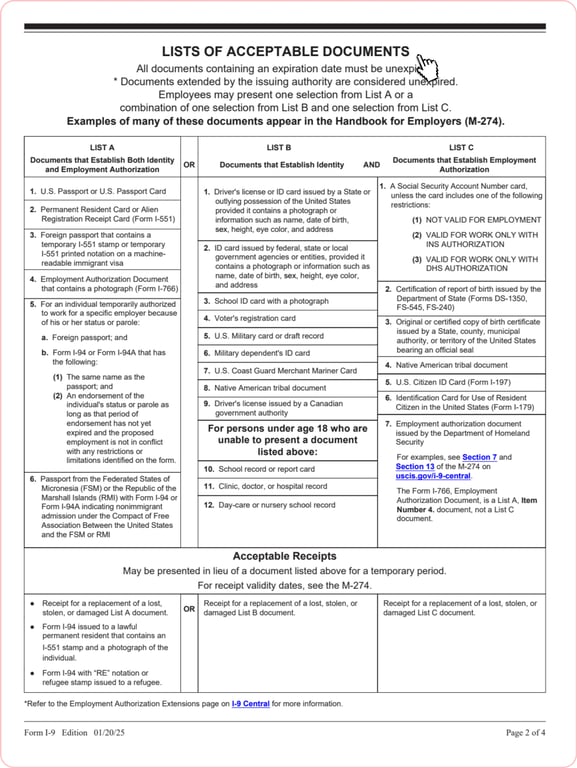
Note: To satisfy the verification rules, you can show either a single document from List A. Otherwise, you must pair one selection from List B with one selection from List C. A List B item only proves who you are. It always requires a matching List C item to prove you can legally work in the United States.
How to fill out an I-9 form
You can easily handle your employment eligibility forms online. Our editor allows you to follow the official instructions and fill out every section digitally from start to finish.
Use these steps to finish the process:
Step 1. Open the fillable form in the online editor.
Step 2. Let the worker and the employer fill in their sections.
Step 3. Download the finalized document as a high-quality PDF.
Step 4. Create a printable I-9 form for a physical backup of your company records.
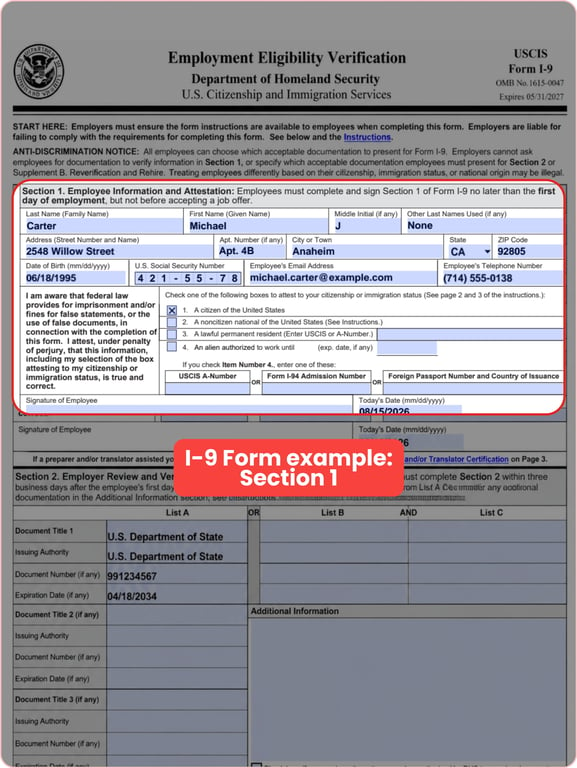
How to fill out an I-9 form: Section 1
New hires must complete this section no later than their first day of work.
Follow these steps to finish Section 1:
Step 1. Type in your name, address, and date of birth.
Step 2. If the employer is part of E-Verify, add a Social Security number.
Step 3. Select your immigration status to state your citizenship or immigration status.
Step 4. Sign and date the form.
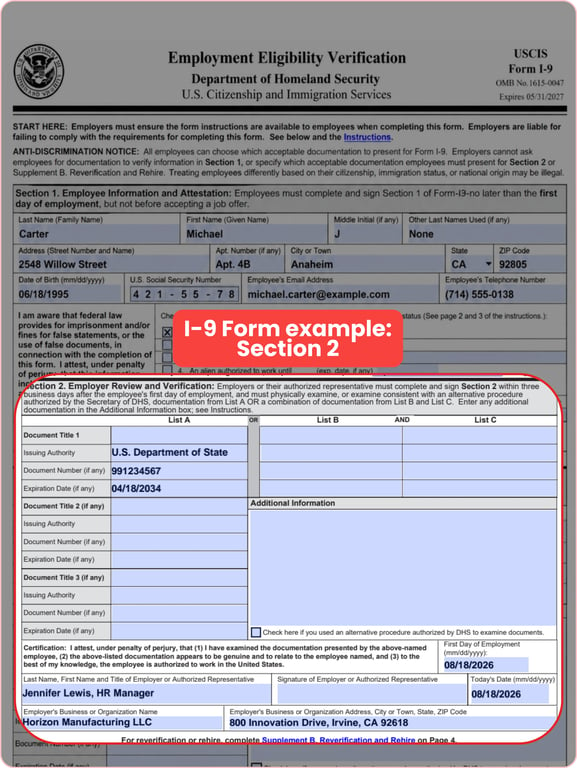
How to fill out an I-9 form: Section 2
The employer or an authorized representative must complete Section 2 within three business days of the employee's first day.
Follow these steps to finish Section 2:
Step 1. Review documents. Check the worker's identity and work authorization papers.
Step 2. Write down the document title, issuing authority, document number, and expiration date.
Step 3. Add business details: Enter the employee's first day of work and the company's address.
Step 4. Sign the document to finalize the section and verify the documents.
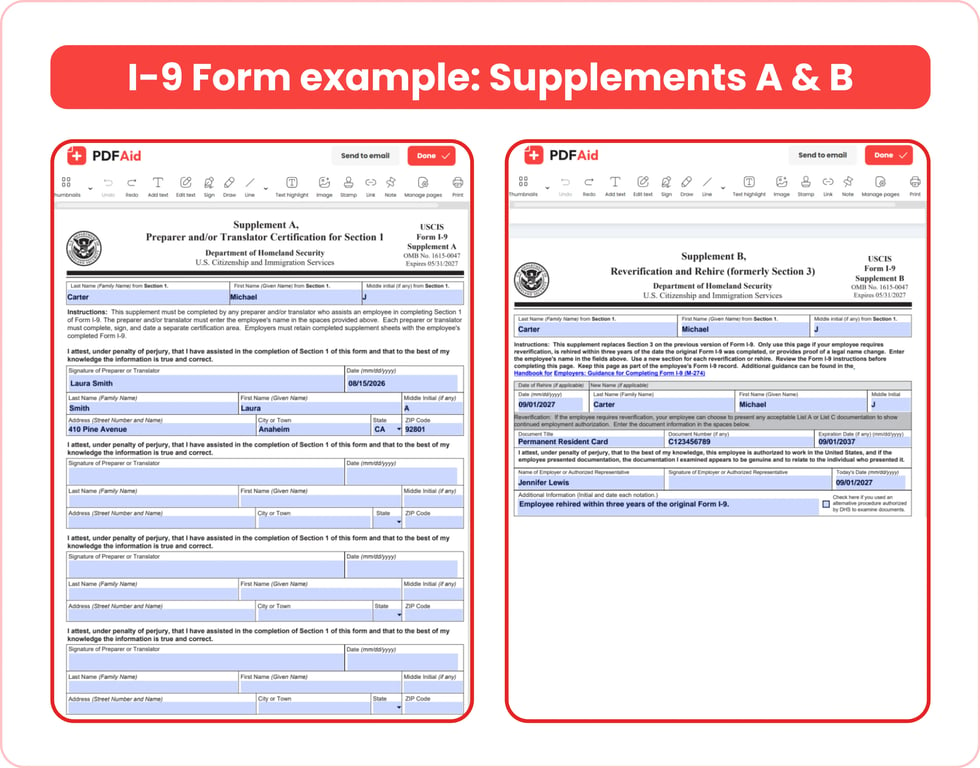
How to fill out an I-9 form: Supplements A & B
The supplementary pages are only filled out when specific situations apply.
Supplement A: Preparer and/or Translator Certification is necessary if another person helps the worker fill out Section 1. This helper must provide their own signature, date, full legal name, and physical address.
Supplement B: Reverification and Rehire is completed by the employer. It is used when an employee is rehired within three years of the original form date. It is also used to record a legal name change or when a worker's temporary employment authorization expires and needs an update.
How to sign and download Form I-9
Open the finalized form: Access your completed document in our online editor.
Review the completed form.
Apply your signature: Click on the signature field and draw or add your electronic signature.
Send to the other person: Just forward the document link to the other person. This way, they can sign their part electronically.
Download the file: When everyone has signed, download the completed form as a PDF file.
Always save a copy for your records. This is to stay in compliance with rules, for record keeping.
I-9 retention, audits, and penalties
Employers must follow the I-9 retention rules for keeping these forms on file. You need to keep a completed form for three years after the hire date, or for one year after the employment ends. You must go with whichever date comes later.
If you do not keep accurate records, your company might face an audit. An I-9 audit is an official inspection to check if your business verifies employment eligibility correctly. This is done by U.S. Immigration and Customs Enforcement.
Should the ICE find any flaws in the audit, I-9 penalties will be imposed. The range of fines depends on the type of mistake, and the amounts of fines are regularly changed because of inflation.
Form I-9 deadlines (the three-day rule)
Completing the form comes with strict federal deadlines. Section 1 must be filled out by the employee no later than their first day of work. The employer then has three business days from the date the hire starts to fill out Section 2. Many refer to this as the 3-day rule.
For example, if a new employee begins work for pay on Monday, they must complete Section 1 by Monday. The employer then has until Thursday to review the employee’s documents and complete Section 2.
I-9 reverification and correcting errors
There are certain situations when you will need to update or correct a Form I-9:
1. Correcting a mistake on the form
Cross out the incorrect information without blocking it out completely. Write the correct details, then add your initials and the date next to the change. Do not scratch out the original or use correction fluid. If you make too many mistakes, fill out a new form and attach it to the first one.
2. An employee's work authorization is expiring
Use Supplement B to handle the reverification process. You must complete this step before or on the exact day their current work permit expires. You generally do not need to do this for U.S. citizens or lawful permanent residents who show a valid green card.
3. Handling a company rehire
In the first three years after receiving their original form, you can use Supplement B to rehire them. If their original form is still valid and they are allowed to work, you can update their record, rather than making a new one.
Remote I-9 verification and E-Verify
Even when you hire remote workers, you should still confirm their identity and employment documents. Under the standard rule, you can name an authorized representative to look at the physical documents in person and sign Section 2 for you. However, if your business uses E-Verify and meets specific rules, you can use an alternative process approved by the DHS. This allows you to inspect the documents remotely over a live video call instead of meeting in person.
Remember that E-Verify isn’t the same thing as the actual Form I-9. The E-Verify system is a website that checks if someone is allowed to work. It does this by looking at the information on the Form I-9 and comparing it to information in databases. You and your employer both rely on the I-9 and E-Verify to confirm you're authorized to work.
Get the most current I-9 – Employment Eligibility Verification form now
Up-to-date • Fillable • Ready to sign online