Get the most current Rental Ledger Form and subscribe to download
A rent payment ledger is a financial document used by landlords and tenants to keep detailed records of rent payments. Fill in this form, change it, and sign it in your browser with our all-in-one PDF editor. When you're done, download or send your document without extra software.
What is a rent ledger?
A rent ledger, often called a rental ledger, tenant ledger, or lease ledger, is a document that tracks all housing payments in chronological order. The core meaning of this file is to maintain an accurate, date-by-date history of your tenancy financials.
This log serves a few main purposes during a lease:
Maintain the record: The property owner documents every received rent payment, security deposit, and late fee.
Receive the file: Renters get a copy of the document to verify their past and present payment amounts.
Track all transactions: The document monitors active payment balances, due dates, and debts.
Provide evidence: It can be used as reliable evidence to settle payment disputes or support future rental applications.
How to get a rent ledger from your landlord
Write a request: To get a rental ledger, ask your property manager or landlord. You can ask in person, but an email will keep a record of your request.
Specify info: Ask for a tenant ledger with all charges, payments received, deposits, balance, your full name, address, and lease dates.
Dealing with a landlord's refusal: If you do not receive the rental ledger from a private landlord, send a certified letter to follow up. State laws dictate how to provide a rent ledger to residents. Contact a local housing authority or tenant group if they still refuse.
How to track past due rent in a ledger
Property owners use a past due rent ledger to document missing payments chronologically. The landlord keeps a detailed log of financial defaults as they occur. Landlords keep this record accurate for several financial and legal reasons:
Keep exact details: Write down the due date for rent, the unpaid balance, and any late fees.
Carry forward the remaining balance: Add the unpaid rent to the next month's total.
Gather evidence: Establish a time frame for the non-payment of rent or eviction notice.
Prepare for court disputes: Present the itemized payment history as documented proof during housing lawsuits.
Note: Your state's laws regarding overdue rent can vary greatly, so check your state's laws about grace periods and eviction dates before you take legal action.
What does a rent ledger look like

How to fill out a rent ledger
Step 1. Open the form: Access our online editor to view the fillable rent ledger.
Step 2. Fill out the details: Enter the calendar year, tenant's name, and property address. Input the exact monthly rent amount and due date.
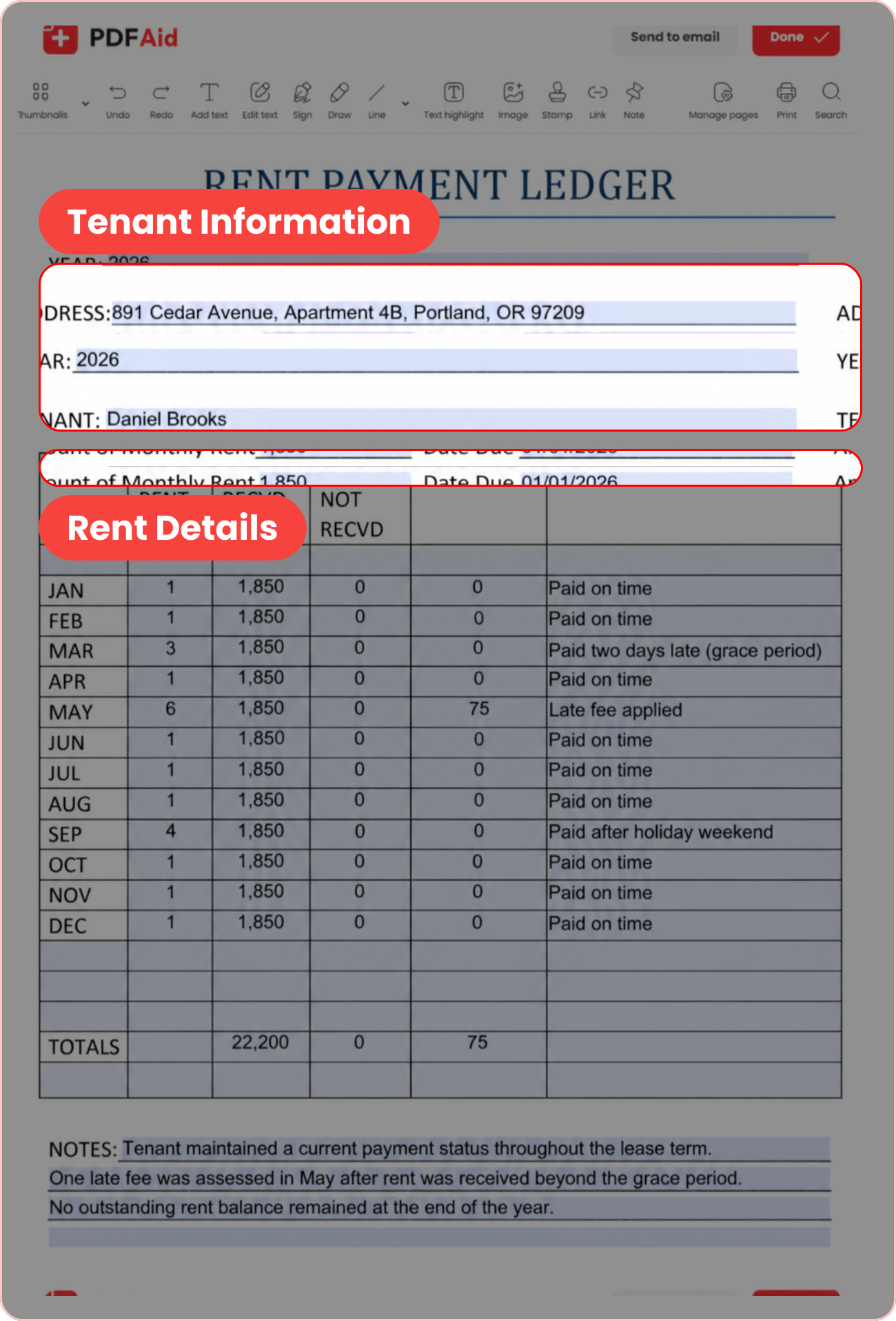
Step 3. Track payment dates and received rent: Note the day you received the rent and the exact amount the tenant paid.

Step 4. Track unpaid rent and penalties: Use the designated columns to track any rent not received and late fees you have to charge.

Step 5. Add comments and make extra notes: If you wish to include any payment methods or quick comments, write them in the comments column. For any general comments, you can also write them on the lines that follow the body of the paper.

Step 6. Calculate the totals: Add up all the numbers in the columns, and write the final sum in the totals row.

Step 7. Download your file: Save this ledger as a PDF file or save it as a printable template.
Get the most current Rental Ledger form now
Up-to-date • Fillable • Ready to sign online