Get the most current Ontario Lease Agreement Form and subscribe to download
An Ontario Lease Agreement form (form 2229E) is a standardized rental agreement required for most residential properties in Ontario under the Residential Tenancies Act (RTA). Our platform gives you access to the most current Ontario lease agreement form that you can fill in and sign without printing – right from your browser and with no software installation required.
What Is the Ontario Standard Lease Agreement?
A Residential Tenancy Agreement Ontario is a government-issued form that landlords must use for most new residential tenancy agreements in the province. The mandatory form was introduced by the Ontario Ministry of Housing through the Residential Tenancies Act on April 30, 2018. The official name of this document is Residential Tenancy Agreement (Standard Form of Lease). Its unique number-identifier is 2229E. The form is available in English and French.
Key details of the Ontario standard lease form:
Who signs it: Landlords and tenants.
When is it required: For most residential leases, including those of apartments, basement apartments, rented condominiums, and single/semi-detached houses.
When was the form last updated: In December 2020; the updated version of the form is mandatory for all tenancies signed on or after March 1, 2021.
Sections of the Ontario Standard Lease (Form 2229E)
The official Ontario lease form consists of the following sections:
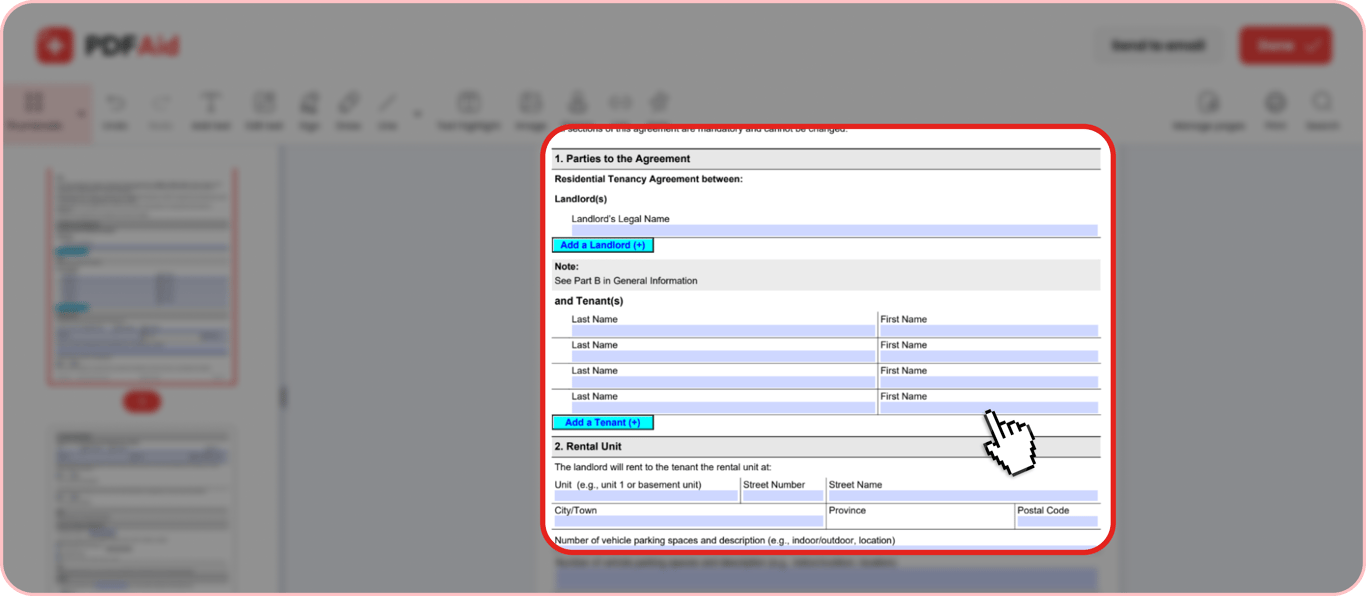
Parties to the Agreement – Defines who the agreement is made between and provides full legal names of the landlord(s) and the tenant(s).
Rental Unit – Provides essential details of the property, including the type of unit (e.g., apartment or condo number, basement, upper level, etc.), full address with postal code, and the number of parking spaces with descriptions (e.g., outdoor or indoor). There are also two check boxes for landlords to specify whether the specific rental unit is located in a condominium.
Contact Information – Shares the landlord’s mailing address for giving notices and documents. There are two additional fields for when a landlord and a tenant agree to receive notices and documents via email, and when a landlord provides an email or phone number for emergencies or day-to-day communication.
Term of Tenancy Agreement – Specifies the start day of the tenancy and its type (e.g., a fixed-term tenancy, month-to-month tenancy, or another).
Rent – Details the amount of rent, when it must be paid, payment method, and additional provisions related to payments.
Services and Utilities – Lists all the services, such as gas, on-site laundry, guest parking, and others, included in the rent for the given rental unit and marks who is responsible for each kind of utility.
Rent Discounts – Specifies if there are any rent discounts and provides their detailed explanation.
Rent Deposit – Clarifies whether a deposit is required and its sum.
Key Deposit – Clarifies whether a key deposit is required and its sum.
Smoking – Specifies whether smoking is allowed in the unit and provides any additional rules that apply to smoking.
Tenant’s Insurance – Details if there are any insurance requirements for a tenant.
Changes to the Rental Unit/Maintenance and Repairs/Assignment and Subletting – These three sections are formulated according to the current Ontario laws and are not fillable.
Additional Terms – Clarifies what additional rent terms can be agreed on between a landlord and tenant and provides two check boxes to specify if a particular agreement has additional terms (if yes, they must be attached to the agreement).
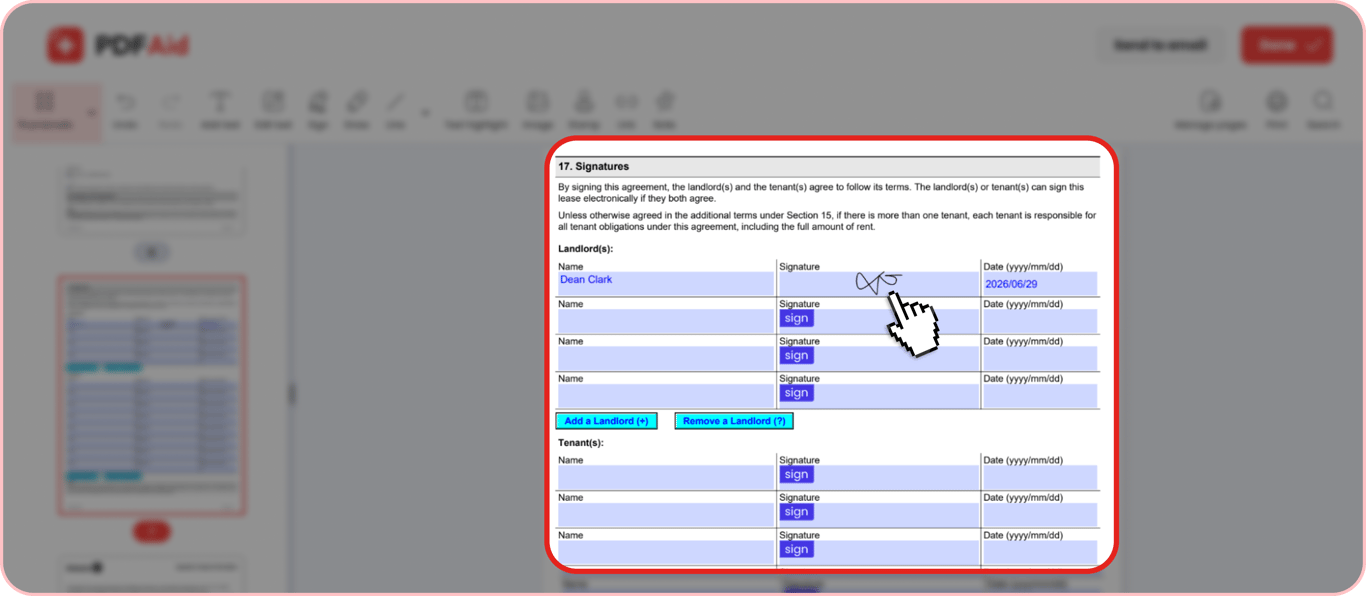
Signatures – Provides space where all participants of the agreement need to type their names, put their signatures, and indicate the date of signing.
How to Fill Out the Ontario Standard Lease Agreement Online
Here’s how to complete a rental agreement in Ontario step by step using our fillable PDF form:
Step 1. Go to the 2229E Residential Tenancy Agreement Ontario page on PDFAid and click Get form to open it in our PDF editor.
Step 2. Fill in the parties section by providing the full names of the landlord and all adult tenants.
Step 3. Specify the type and address of the rental unit, add parking details, and check Yes or No to indicate if the given unit is in a condominium.
Step 4. Fill in the mailing address of the landlord. If the parties agree to receive notice and documents via email, check Yes and type the email. If the parties agree to handle emergencies and day-to-day communications via email or phone, check Yes and provide additional details.
Step 5. Type the start date of the tenancy and check one of the boxes to indicate its type. If it’s a fixed-term tenancy, specify the end date. If you check Other for tenancy type, provide a clarification, for example, a daily or weekly rent.
Step 6. Specify the day (e.g., first or last) when rent is due and check if it’s paid monthly or in another way (specify how, for example, weekly). Type the sum of the base rent and parking/other services if applicable, then type the total lawful rent. Type the name of the person or company that the rent is payable to and mention the agreed payment method. Fill in additional fields to specify the rent to be paid for a partial period (if applicable) and the administration charge in the case of insufficient funds.
Step 7. Check Yes or No next to every listed service that’s already included in the lawful rent and provide additional service details if necessary. Check Landlord or Tenant next to the main utility types to indicate who will be covering respective expenses. Provide additional details concerning utilities (e.g., if a tenant is required to set up accounts with utility providers) if necessary.
Step 8. Check one of the two boxes to clarify if there is a rent discount or not. If yes, provide a description.
Step 9. Check one of the two boxes to clarify if the rent deposit is required. If yes, type the sum of the deposit.
Step 10. Check one of the two boxes to clarify if a refundable key deposit is required. If yes, type the sum of the deposit and additional description specifying the number of keys, remote entry devices, and access cards provided to the tenant.
Step 11. Check one of the two boxes to clarify if smoking is prohibited or allowed. If it’s allowed, describe smoking rules in the box below.
Step 12. Check one of the two boxes to clarify if tenant insurance is required.
Step 13. Check one of the two boxes to clarify if there are any additional terms to the agreement.
Step 14. Click Done in the upper right corner and export the completed form as a PDF. You can also send the document to an email.
How to Sign the Ontario Standard Lease Agreement
After you fill out the 2229E form with PDFAid, you can export it as a printable PDF and sign it physically. Or you can save time and sign the document electronically right in our editor. Electronic signatures in the 2229E form are legally valid in Ontario under the Electronic Commerce Act, 2000 (ECA).
Open the completed document in our PDF editor and scroll down to the Signatures section.
Select one of the signature fields under the Landlord(s) or Tenant(s) block.
Type your full name. Next, click Sign and draw, upload, or type your signature. Lastly, type the signing date in the standard yyyy/mm/dd format.
After you collect the signatures of all agreement participants, save the signed document as a PDF and share it with the parties.
Room Rental Agreement
The standard 2229E form is used in most tenancy cases, including those in which a tenant rents a room. However, Ontario law has a clear distinction between when a tenant shares a kitchen and bathroom with other roommates or lives with the landlord in the same property but doesn’t have any shared spaces with them, and when a tenant shares a kitchen or bathroom with the landlord or certain members of the landlord’s immediate family covered by the RTA exemption.
Unlike a standard room rental, such arrangements have no RTA coverage, which means that the standard tenant protections do not apply in this case. This form of tenancy does not require an Ontario Standard Lease agreement. Instead, it may use a common-law Room Rental Agreement.
Other differences include:
Less formality required in notices
More flexible rental terms
No provincial caps on rent
Simplified eviction process
Disputes are generally handled through the courts rather than the Landlord and Tenant Board.
Here’s how to create and sign a contract for room rentals that aren’t covered by RTA:
Step 1. Create a Room Rental Agreement instead of the standard Ontario Lease agreement. You can build it from scratch or find a template on the web.
Step 2. Identify the parties to the agreement and specify their full names.
Step 3. Fill in the rental unit information, including the address and the room(s) being rented.
Step 4. Clearly define which property spaces are private and which are shared.
Step 5. Detail the rent amount, due date, payment method, utilities and services coverage, and security deposit.
Step 6. Build a comprehensive section with house rules. This section must cover the agreed-upon rules on smoking, pets, guests, cleaning, and quiet hours.
Step 7. Specify the end date and notice period required for eviction.
Step 8. Collect the signatures of all participants of the agreement and date the document.
Get the most current 2229E Residential Tenancy Agreement Ontario - Essential for Post-March 2021 Tenancies form now
Up-to-date • Fillable • Ready to sign online