Get the most current IMM 5257 form and subscribe to download
When applying for a temporary resident visa in Canada, applicants must complete and submit the IMM 5257 form. The form collects extensive personal and background details for further application evaluation by the Immigration, Refugees and Citizenship Canada (IRCC) officers.
In order to increase the likelihood of obtaining a visa, applicants must ensure they complete the most current IMM 5257 form. On our platform, you will find the latest form that you can fill out, edit, and sign directly from the browser.
What Is the Canada Visitor Visa Application (IMM 5257)?
An application for a temporary resident visa (TRV) is a formal procedure for obtaining a temporary resident visa (also called a visitor visa) – a document that the IRCC sticks in your passport to allow you to travel to Canada. The IMM 5257 is the official, government-issued form used in the TRV application process to collect the necessary details from an applicant.
Who needs a visitor visa:
Most people traveling to Canada
Some people transiting through Canada
Pay attention to the fact that this type of visa is NOT a work or study permit; it’s meant for individuals from visa-required countries to grant legal entry and travel to Canada for temporary, non-immigrant purposes.
IMM 5257 Form Structure and Key Sections
The IMM 5257 consists of 7 main sections:
Section’s Name | Personal details |
|---|---|
Explanation | Covers the primary identifiable information. |
What’s Included |
|
Additional Notes |
Section’s Name | Contact information |
|---|---|
Explanation | Provides additional and alternative contact means for further correspondence. |
What’s Included |
|
Additional Notes | Adding an email address authorizes digital correspondence concerning your application, which may simplify the process. |
Section’s Name | Details of visit to Canada |
|---|---|
Explanation | Communicates why and when you are traveling to Canada to support your visa application to officers. |
What’s Included |
|
Additional Notes |
Section’s Name | Education |
|---|---|
Explanation | Provides details about the applicant’s post-secondary education. |
What’s Included |
|
Additional Notes |
Section’s Name | Employment |
|---|---|
Explanation | Shares the applicant’s employment history for the past 10 years. |
What’s Included | This section includes three dedicated fields (one for each role) that cover the following information:
|
Additional Notes |
Section’s Name | Background information |
|---|---|
Explanation | Asks several questions to help the IRCC officers evaluate the applicant’s background |
What’s Included | This section includes questions about:
|
Additional Notes | If you answer “yes” to any of these questions, you may need to complete IMM 5257 Schedule 1, an additional background and travel history form the IRCC uses to reach a decision. |
Section’s Name | Signature |
|---|---|
Explanation | Provides consent for being contacted by the Citizenship and Immigration Canada (CIC) and for releasing all records and information needed to process the application. |
What’s Included |
|
Additional Notes |
Depending on the application method, you should use either the IMM 5257 form with a barcode or a standard PDF form. The form with a barcode generates a unique 2D barcode after you validate the completed form. This barcode contains your encrypted data and allows IRCC officers to scan it and instantly upload your information into their system. This method is used when applying for a visa on paper, using the mail.
The standard PDF IMM 5257 form is the identical document used for online applications through the applicant’s IRCC account.
The main difference is that you can easily edit a standard PDF from a browser using a PDF editor like ours. The form with the barcode requires Adobe Acrobat Reader version 11.0.09 to generate a barcode. This means you will need to install additional software.
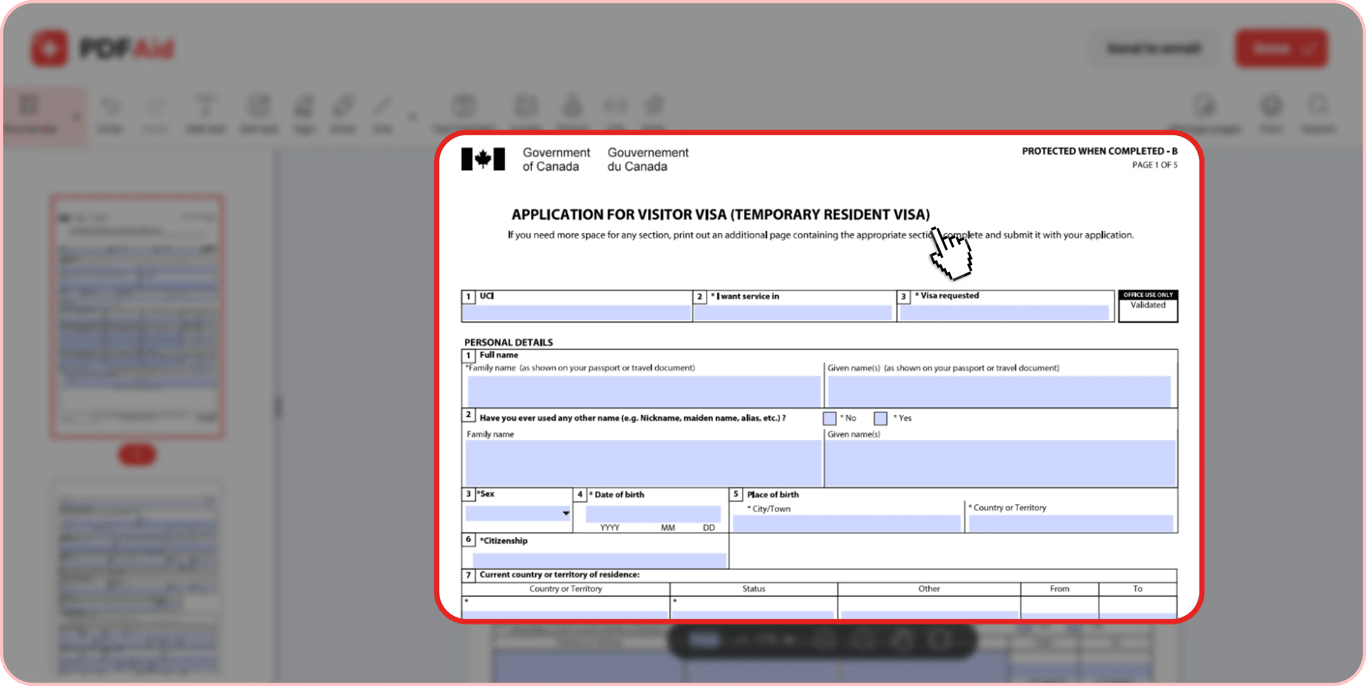
How to Fill Out IMM 5257 Online
Generally, the Canada visitor visa application process consists of two important preparation stages – the completion of the IMM 5257 form and the collection of the required supporting documents. In the following sections, we’ll give you step-by-step instructions for both parts of the process.
Step-by-step Guide to Completing IMM 5257
The easiest way to complete your TRV application form is online. On our platform, you will find the complete and current IMM 5257 form that you can instantly fill in online and sign. By taking this path, you eliminate the unnecessary additional steps, such as the IMM5257 download from the Canada.ca website, software installation, and mailing.
Here are the steps you need to take to fill in the form using our editor:
Step 1. Go to the IMM 5257 form page on our platform and click Get Form. Our PDF editor instantly opens with the fillable form inside.
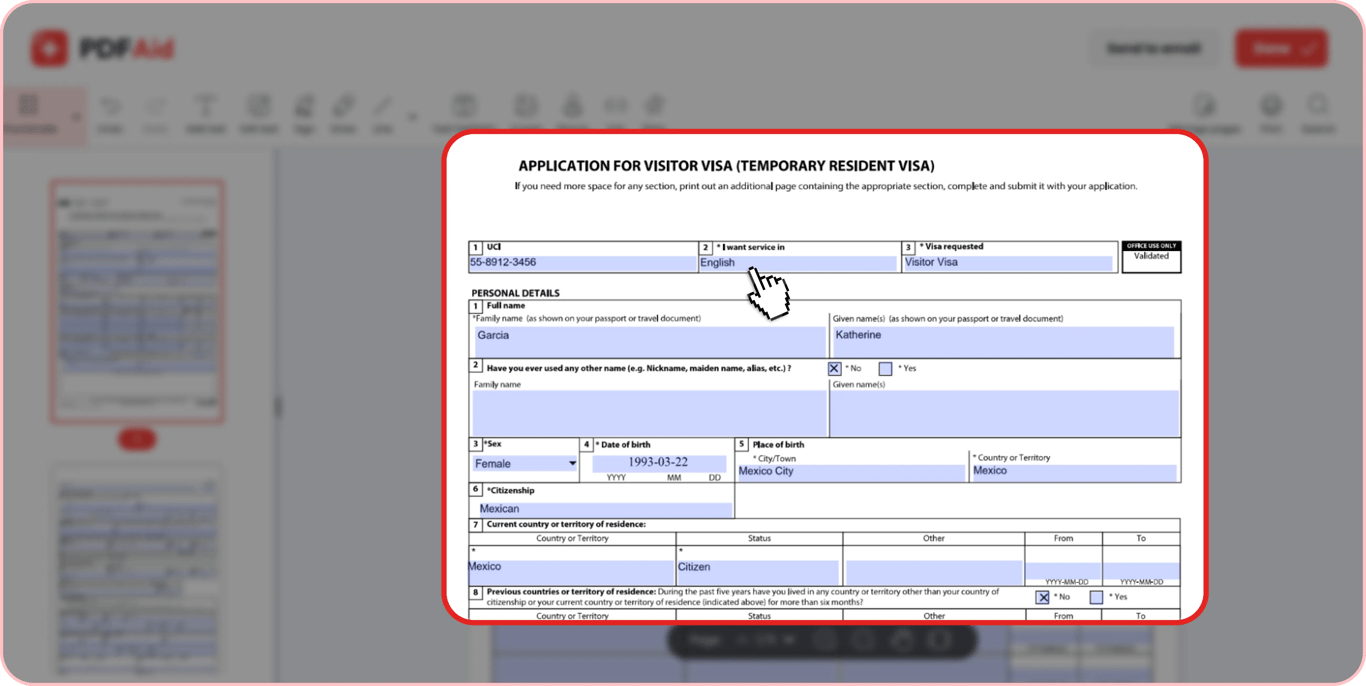
Step 2. Fill in the first line that contains the UCI, I want service in, and Visa requested fields. In the UCI box, type your 8- or 10-digit Client ID. You should have it if you have applied to IRCC - check your previous visas, IRCC letters, and study/work permits, if any. In the I want service in box, state English or French as your preferred correspondence language. In the Visa requested box, pick Visitor visa for a standard TRV or Transit visa for transits.
Step 3. Indicate your name and date of birth at the top of every page except for the first one.
Step 4. Fill out the Personal Details section with your information. Don’t leave fields blank unless the given field does not relate to you (e.g., if you check No next to a clarifying question). Remember to type any names as they appear in official, government-issued documents, follow the required YYYY-MM-DD date format, and provide all details accurately and double-check them to prevent errors.
Step 5. Complete the Contact Information section. Don’t forget to provide your email address if you prefer digital correspondence.
Step 6. Complete the Details of Visit to Canada section. Specify the purpose of your visit. It can be Tourism, Family/Friend visit, Business, or Short-Term studies. Remember that the purpose should be indicated honestly, according to your plans. Type your exact intended dates. Then, type the amount of money you’re planning to bring with you. The recommended amount can vary significantly based on the duration of your stay and whether you will stay with friends/family or not, but generally, visa experts recommend bringing $CAD 5,000 for stays up to 30 days. If you are going to visit any people or institutions, indicate their names and addresses.
Step 7. If you have completed postsecondary studies, check Yes in the Education section and provide information about your highest level of education.
Step 8. Fill in the details of your current and past jobs in the Employment section. Don’t leave these fields empty. Even if you are retired, currently studying, or unemployed, provide this information. For retired applicants, it’s required to provide the employment history for the 10 years before their retirement.
Step 9. Answer all the questions in the Background Information section. Answer honestly because providing any misleading information can lead to a visa refusal. If you answer “yes” to one of the questions that has a large, empty box, provide clear explanations of the situation.
Step 10. When all the relevant fields are filled out, click Done in the upper right corner of our editor, give your file a descriptive name, and save as PDF to save the progress. Further in this guide, we’ll also cover the steps for signing your form.
If you are hesitating on how to fill in a particular section, you can find a sample of a completed form on the web for clarification.
Required Documents and Checklist
To have your application processed, you need to provide a number of additional forms and supporting documents to confirm the information stated in your IMM 5257 form. The final list of documents required for your application depends on your personal situation, such as your marital status, financial situation, and purpose of travel.
Here’s a complete checklist of supporting documents and forms created based on the latest (May 2026) IRCC guidelines:
Document/Form | IMM 5707 Form |
|---|---|
Who Needs It | All applicants of 18 years and older. |
Additional Notes | The form provides additional information about your immediate family. |
Document/Form | IMM 5409 Form |
|---|---|
Who Needs It | Only applicants who are in common-law relationships. |
Additional Notes | The form is used to confirm a conjugal relationship. Refer to the visa office in your region of application. |
Document/Form | IMM 5476 Form |
|---|---|
Who Needs It | Only applicants who use the services of a representative. |
Additional Notes | The form authorizes your representative to handle visa procedures and correspondence on your behalf. |
Document/Form | IMM 5475 Form |
|---|---|
Who Needs It | Only applicants who need their IRCC and Canada Border Services Agency (CBSA) case details to be shared with a third party (e.g., a representative). |
Additional Notes | The form authorizes IRCC and CBSA to release your personal information. |
Document/Form | Copy of the information page of a valid passport/travel document |
|---|---|
Who Needs It | All applicants. |
Additional Notes | The copy must showcase the document number, issuance and expiry dates, your photo, and personal information. The document must be valid for at least 6 months from your expected date of travel. There must be at least one blank page (not the last one) in your document for a visa. |
Document/Form | A copy of a valid US nonimmigrant visa |
|---|---|
Who Needs It | Only applicants who hold such a visa. |
Additional Notes | The copy must show the visa details (e.g., type, issuance and expiry dates, etc.) and your personal information. |
Document/Form | A copy of the current immigration status |
|---|---|
Who Needs It | Only applicants who reside in a country that’s not the same as their citizenship country. |
Additional Notes | The copy is necessary to prove your legal status in the country of residence. |
Document/Form | A copy of a Marriage License/Certificate |
|---|---|
Who Needs It | Only applicants who are married at the time of application. |
Additional Notes | Refer to the responsible visa office for your region for additional information. |
Document/Form | Proof of financial support |
|---|---|
Who Needs It | All applicants. |
Additional Notes | The document must indicate that you can cover all travel-related costs. It can be a:
|
Document/Form | Purpose of travel |
|---|---|
Who Needs It | All applicants. |
Additional Notes | Depending on the purpose indicated in your application, it can be:
|
Document/Form | Two photos |
|---|---|
Who Needs It | All applicants, except those who have to provide biometrics, their photo is captured during that process. |
Additional Notes | The photos must be identical, unaltered, and taken within the last 6 months. Write your name and date of birth on the back of every photo. Photo size: 35 mm x 45 mm (1 3/8″ x 1 3/4″). Crown to chin: between 31 mm and 36. |
Document/Form | Proof of payment |
|---|---|
Who Needs It | All applicants. |
Additional Notes | Applicants must pay application fees and provide a copy of a receipt. |
Document/Form | Additional documents |
|---|---|
Who Needs It | Depends on the situation and the region of application. |
Additional Notes | Refer to the visa instructions specific to your region of application to learn about any additional supporting documents you might need. |
How to Sign IMM 5257 Electronically
When you have a completed form and a full package of supporting documents, one last thing you need to do is sign and date your IMM 5257. Our editor lets you do this online in a few quick steps:
Step 1. Open the filled-out form in our editor.
Step 2. Scroll down to the last page and click on the signature box.
Step 3. Draw, upload, or type your signature.
Step 4. Add the current date.
Step 5. Click Done and save the signed document.
IMM 5257 Fees, Processing Time, and Status
Almost all TRV applicants must pay the application fee and submit a receipt of the payment with their IMM 5257 form. However, not everyone pays the same fees. The overall visa fee expenses depend on whether you travel alone or with a family, whether you need to provide biometrics, and other individual factors.
The time needed to process each application may also vary. It depends primarily on where you apply from and how complete your application is.
Visitor Visa/TRV Application fee
Generally, there are two types of fees that you may pay when applying for a TRV: an application fee and a biometrics fee. The primary factors affecting the total TRV cost include:
Biometrics: Individuals who need to provide biometric fingerprints pay an additional fee. This applies to applicants between 14 and 79 years. Exceptions are people who have already provided biometrics for another Canadian application, hold permanent residency or a diplomatic/official visa, hold a valid U.S. visa, or are transiting through Canada.
Solo vs. family travel: If you are traveling to Canada with your family and covering all expenses, you will have to pay a fee per individual who applies for a visa.
Large groups: There is a legal cap on fees that applies to groups/families of 5 or more people.
Exemptions: Diplomats, people who perform certain official duties, and applicants covered by specific international agreements may have their fees waived completely.
As of 2026, the IRCC applies the following fees applicable to visitor visas:
Fee | Application |
|---|---|
Cost | $CAD 100.00/individual $CAD 500.00/family or group of 5+ people |
Fee | Biometrics |
|---|---|
Cost | $CAD 85.00/individual $CAD 170.00/family of 2 or more $CAD 255.00/group of 3 or more performing artists and their staff |
Payment options: Online with a special payment account and credit card, prepaid card, or debit card (not necessarily in the applicant’s name).
Processing Time
The average TRV processing time ranges from about 1-2 weeks to 150+ days depending on the country you apply from. For example, applications from Israel take about 16 days to process, whereas applications from Iran are processed in about 150 days. However, the exact processing time can vary for each particular application depending on:
Application completeness
Data accuracy
Biometrics appointment
Case complexity
Country of application
Seasonal volume
To estimate the time needed to process your application, use the IRCC’s official processing time check tool:
Choose Temporary Residence (visiting, studying, working) from the first drop-down menu.
Choose if you are applying from outside or inside Canada.
If applying from outside of Canada, select your country of application.
Check Application Status
After you submit your application, there are two ways to stay updated on its status:
Through your IRCC account: Sign in to the account you used to apply and check real-time status updates. If you applied using this method, you will also receive messages regarding your case status. If you applied on paper, you need to create an IRCC account and link your application to it for status checks.
Through VFS Global: If you submitted your passport or biometrics at a Visa Application Centre, you can track the physical movement of your documents with the VFS Canada tracking service.
There are four status types you need to recognize when checking your application:
Application Received – Your application is already in the IRCC and is waiting for an initial review.
In Progress/Under Review – Your application, supporting documents, and biometrics are being carefully reviewed.
Decision Made – The officer who reviewed your application has decided to approve or refuse your visa, but the formal notification and passport return instructions are not ready yet.
Finalized – The application processing is complete. You will receive either instructions on how to submit your passport for stamping or a refusal letter.
Applying for a TRV from Inside Canada
Although many visitor visas are applied for from outside Canada, in some cases, you can apply from inside. This rule applies to people who are currently in Canada and have valid permits.
TRV Application Inside Canada
To qualify for a temporary resident visa application within Canada, applicants must meet the following criteria:
Be currently in Canada;
Hold a valid study/work permit;
Have an expired, about-to-expire, or 1-entry-only visitor visa;
Plan to leave and return to Canada in the near future (a study/work permit alone won’t let you do that).
If you meet the aforementioned criteria, the IRCC recommends applying for a new visitor visa at least 2 months before your expected date of departure and not going out of the country until the visa is approved. Leaving earlier could mean additional requirements, such as a medical exam and/or biometrics, and a longer processing time, which could delay your return to Canada.
Even if you apply from inside Canada, you will still need to complete the typical IMM 5257 form, the same way as if you apply from outside. However, some specs apply:
For the purpose of travel, select study if you hold a study permit and work if you hold a work permit.
Choose Canada as a country of residence.
Provide the details of your study or work in the application.
Inside vs Outside Canada and Extensions
Whether you should apply from inside or outside Canada or choose to extend your visa rather than apply for a new one depends on your current status, the need to leave Canada, and your immigration category. Here’s a detailed comparison to help you understand when to choose which option and how this will affect the process.
When it’s used | |
Applying from Inside Canada | When you’re inside Canada and have a valid study/work permit, but your visa has expired (or will expire soon), and you need to leave Canada and come back. |
Applying from Outside Canada | When you’re outside Canada and plan to travel to the country for tourism, a family visit, or another purpose. |
Canada Visitor Visa Extension Application | When you’re inside Canada and want to stay longer than 6 months (or longer than currently permitted and you don’t plan to leave the country). |
Purpose of the document | |
Applying from Inside Canada | To get a new visa sticker and secure repeat entry after you leave the country. |
Applying from Outside Canada | To receive an initial document for legal entry and stay. |
Canada Visitor Visa Extension Application | To extend your legal stay. |
Form to use | |
Applying from Inside Canada | IMM 5257 |
Applying from Outside Canada | IMM 5257 |
Canada Visitor Visa Extension Application | IMM 5257 |
Key specs | |
Applying from Inside Canada |
|
Applying from Outside Canada |
|
Canada Visitor Visa Extension Application |
|
Passport process | |
Applying from Inside Canada | Approved applicants receive a Passport Request (PPR) from IRCC and must submit their passports to the Case Processing Centre in Ottawa (CPC-Ottawa) via courier. |
Applying from Outside Canada | Approved applicants must submit their passports to a Visa Application Centre (VAC) in their region to get a new sticker. |
Canada Visitor Visa Extension Application | No need to submit a passport. Approved applicants receive a separate document, the Visitor Record, via mail. |
Get the most current Canada IMM 5257 form now
Up-to-date • Fillable • Ready to sign online