Get the most current 1095-A Form and subscribe to download
Find a Sample of a 1095-A Form and Learn How to Edit, Sign, and Save It Online
The Form 1095-A is an official statement issued to the recipient of the health insurance purchased from the government or state-based Marketplace. This form is used by health plan recipients to file their taxes and either receive an increased return or pay a surcharge to cover the excess of the subsidies they received.
On our platform, you will find a fillable and printable 1095-A Form that you can use for informational purposes. Also, you can use our editor to edit and/or sign your own copy of the form right from the browser.
What Is Form 1095-A?
Form 1095-A is a Health Insurance Marketplace Statement. It’s provided to individuals who purchase a Qualified Health Plan (QHP) through the Health Insurance Marketplace. It acts as a formal tax document that details who is covered by the insurance, during which months they were covered, and what financial metrics are associated with their policies.
Form 1095-A appeared under the Affordable Care Act (ACA). This healthcare law has introduced special subsidies to individuals who don’t receive health insurance coverage through employment, Medicare, or Medicaid.
What Form 1095-A Is Used For (Premium Tax Credit & Form 8962)
Form 1095-A is used for reconciliation. Individuals who receive insurance through a Marketplace are typically eligible to receive financial assistance (subsidies) called the Advance Premium Tax Credit (APTC). The subsidized amount is calculated based on the estimated annual income of a covered individual.
In this process, Form 1095-A helps calculate the specific APTC for an individual based on their factual income at the end of the year:
The data from Form 1095-A is transferred into the IRS Form 8962 (Premium Tax Credit). The filer must submit Form 1095-A along with their federal tax return (Form 1040).
The IRS checks whether the APTC you received matches your actual year-end income. This can affect your taxes in two ways:
If your income is lower than estimated, you will receive a greater tax refund.
If your income is higher, you will have to pay a surcharge to cover the excess of received financial assistance.
Who Gets a Form 1095-A
Form 1095-A is meant exclusively for individuals (and their tax dependents) who enrolled in a Qualified Health Plan through a Marketplace. One form is provided per policy.
People who receive coverage through another provider, such as private insurers, employers, and governmental programs, get different forms.
What Information Form 1095-A Contains
Form 1095-A consists of three main elements:
Part I: Recipient Information
Part II: Covered Individuals
Part III: Coverage Information
At the top of the form, there are also two check boxes labeled “Void” and “Corrected.” When you receive the form, you must pay attention to these boxes because they determine the validity of the form. If the Marketplace checks the Corrected box, this means that the form you received previously contained an error (e.g., miscalculated monthly premiums, incorrect Second Lowest Cost Silver Plan (SLCSP) benchmark, etc.) and has been updated. In this case, you must disregard the previous form and file the corrected one. If the Marketplace checks the Void box, this means that the previous form was issued in error and the Marketplace is completely canceling it. Most often, this happens if a taxpayer signs up for a policy via the Marketplace but opts out before the coverage is active or if the form was generated for the wrong person.
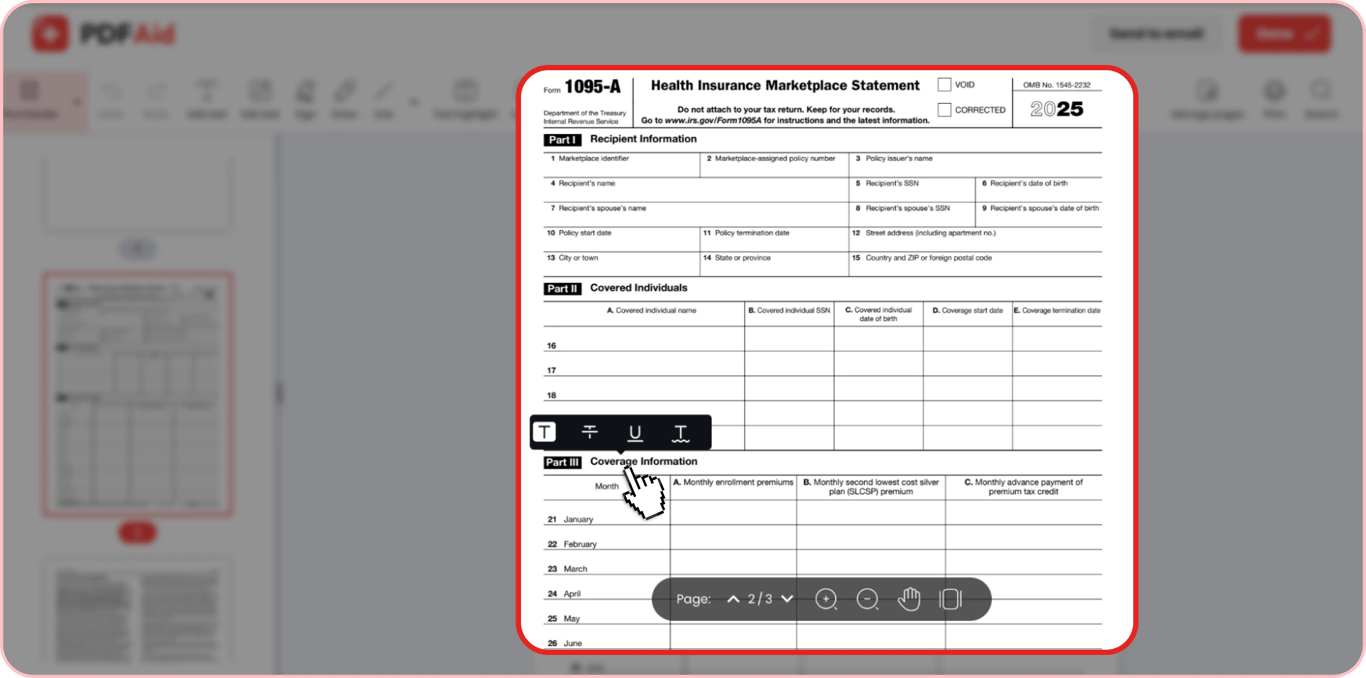
Part I — Recipient & Policy Information (lines 1–15)
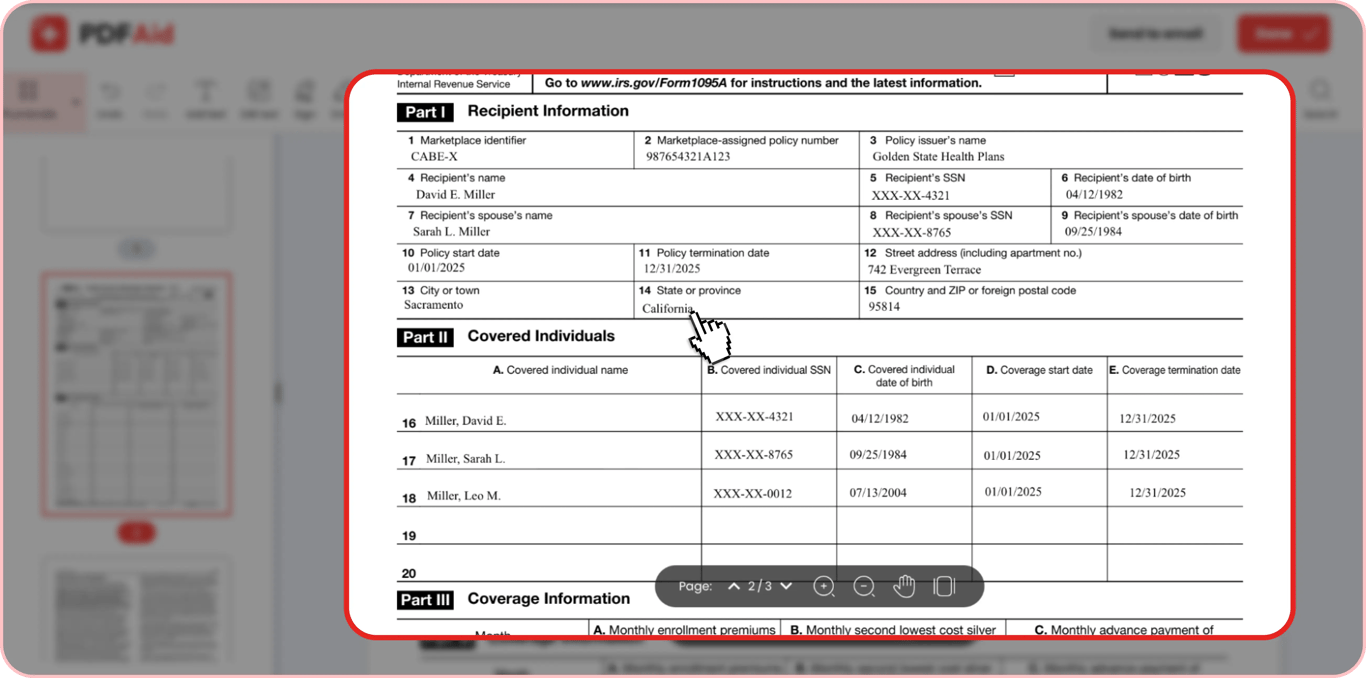
The first block of the form provides complete information about the policy itself (and its issuer) and the individual covered by a policy. It consists of the following fields:
Marketplace Identifier 1095-A: A unique two-digit or multi-digit code that identifies the health insurance exchange where the policy was purchased.
Marketplace-assigned policy number: A unique numerical identifier assigned per policy and meant to track a specific health insurance plan for tax purposes.
Policy issuer’s name: The full name of the insurance provider.
Recipient’s information: Lines 4 to 6 that indicate the full name, SSN, and date of birth of the person who purchased the plan.
Recipient’s spouse’s information: Lines 7 to 9 that indicate the full name, SSN, and date of birth of the spouse of the person who purchased the plan.
Policy information: Lines 10 and 11 that indicate the start and termination date of the insurance plan.
Address details: Lines 12 to 15 that indicate the street address (with apartment number), city, state, country, and ZIP of the primary recipient’s mailing address.
Part II — Covered Individuals (lines 16–20)
This block of the form lists all individuals from the recipient’s tax household enrolled in the insurance plan. The list can include the recipient, their spouse, and other tax dependents, but only if they were all actually covered by the plan.
There are five fields for each individual:
Name
SSN
Date of birth
Coverage start date
Coverage termination date
Here’s a sample of what the completed line can look like:
Covered individual name | Elena Vance-Marlow |
|---|---|
Covered individual SSN | XXX-XX-8421 |
Covered individual date of birth | October 14, 1988 |
Coverage start date | 01/01/2025 |
Coverage termination date | 12/31/2025 |
A standard Form 1095-A includes such fields for up to 5 covered individuals (lines 16-20).
Part III — Coverage Information: Premiums, SLCSP, Advance PTC (lines 21–33)
This section of the form provides a detailed, monthly breakdown of the insurance cost. This comes in the form of a table with one row for each month (January to December), one row for annual totals, and three columns:
Monthly enrollment premiums: Total cost of the plan before any financial help is applied.
Monthly second lowest cost silver plan (SLCSP) premium: The cost of a baseline plan in the recipient’s area that acts as a benchmark for calculating the amount of financial help.
Monthly advance payment of premium tax credit: The amount of subsidy forwarded toward the recipient’s insurance provider by the government.
The last row (line 33) provides a total sum for monthly enrollment premiums, the monthly second lowest cost silver plan (SLCSP) premium, and the monthly advance payment of premium tax credit paid throughout the year.
All this data is then transferred to Form 8962.
How to Get 1095-A Form Online
Form 1095-A is always created by the Marketplace where the insurance plan was purchased. The recipient of the plan cannot create this form themselves.
After a Marketplace prepares the form, it typically sends it via mail and adds it to the recipient’s online account. The primary sources where you can get your form include:
State Marketplace
Marketplace insurer
Download It From HealthCare.gov or Your Marketplace Account
Paper copies of the form are typically legally required to be mailed out by January 31. However, it’s also possible to get your copy online. This is often the fastest way because digital versions of the form become available between mid-January and February 1.
Here’s how to download your form online:
Step 1. Go to HealthCare.gov and log in to your account.
Step 2. On your dashboard, go to Your Applications and choose the coverage year for which you are filing taxes.
Step 3. Click on Tax Forms in the left menu.
Step 4. Find the section called Your Form 1095-A and click Download PDF.
If you cannot find the form in your account, there might be several reasons for that:
You’ve selected the wrong application → try choosing a previous year.
Your state has its own health exchange (e.g., New York, California, Massachusetts) → log into your state portal to download the form.
You don’t have Marketplace coverage → if you have purchased a private insurance plan or received employer-sponsored coverage, you will not get Form 1095-A.
If you need additional help to get your form, you can also contact the Marketplace Call Center at 1-800-318-2596.
Get Your 1095-A From a State Marketplace (Covered California, NY State of Health…)
People who are located in states that have their own state-based exchange don’t have their data listed on HealthCare.gov. They need to obtain their Form 1095-A through a local marketplace.
Some states that have local exchanges include:
California | New York |
|---|---|
California | Colorado |
|---|---|
California | Illinois |
|---|---|
California | Nevada |
|---|---|
California | Pennsylvania |
|---|---|
California | Minnesota |
|---|---|
California | Connecticut |
|---|---|
How to find out if your state has its own marketplace:
Go to the HealthCare.gov Marketplace State Guide.
Choose your state from the drop-down menu.
If your state has its own exchange, you will see a link to visit it under the menu.
Get Your 1095-A From a Marketplace Insurer (Ambetter, Blue Cross Blue Shield…)
If you purchase your health plan through a marketplace but from a specific health insurer, your Form 1095-A is typically available in your marketplace account. But you can often find a copy in your personal account on the insurer’s portal.
The core marketplace insurers are:
Elevance Health (formerly Anthem)
Centene Corporation
Ambetter
UnitedHealthcare
Kaiser Permanente
Blue Cross Blue Shield (BCBS)
Cigna
If you haven’t received your Form 1095-A yet, you can check the name of your insurer in your applications list in the online marketplace account, in the email confirmation, or in the billing record. After finding the insurer’s name, go directly to its portal, log in, and check if a copy of the form is available in your account.
Why You May Not Get a 1095-A (Medicaid, Medicare, Employer Plans → 1095-B/1095-C)
If you were expecting to get Form 1095-A and didn’t, most often this is because you received your insurance plan not through a Marketplace:
If your insurance is issued by a private provider or a governmental program (e.g., Medicaid or CHIP), you will get Form 1095-B.
If your health plan is employer-sponsored, you will receive Form 1095-C.
Who Sends Your 1095-A and When It's Issued
Form 1095-A is always provided by the Marketplace (either a federal or a state-based one) where you purchased your insurance. Typically, the paper-based form should be mailed out before January 31 for the previous tax year. An online copy can be available earlier.
How to Fill Out Form 1095-A Online
Technically, if you are the recipient of the insurance, you do NOT have to fill out Form 1095-A. This form is filled out and provided by the Marketplace. For this reason, our PDF form has a Not For Filing caution notice.
Yet, you can use our editor to open the fillable form and get familiar with its fields, to edit or correct the form, to add a signature, or to create an additional copy of the received form right from your browser, without having to print the received form.
Step-by-Step: Completing the 1095-A Fields
Filling out Form 1095-A consists of the following steps:
Step 1. Complete the information about the policy and its primary recipient in Part I.
Step 2. List all the individuals covered by the same plan in Part II.
Step 3. Include monthly and annual costs in Part III.
Step 4. Double-check all the information in the form for correctness and accuracy.
Using Your 1095-A With Form 8962
After receiving your Form 1095-A, you must fill out Form 8962 and file it along with your tax return. This is required for anyone who receives APTC.
To do this, transfer the data from the Form 1095-A, Part III, Columns A, B, and C to the Form 8962, Part II, lines 12 to 23 into the relevant columns. Fill out annual costs and double-check your advance payment with the actual Premium Tax Credit.
E-sign and Download Your Completed Copy
Technically, you don’t need to sign Form 1095-A. This form is only used to reconcile insurance cost information for tax filing. However, you might want to create a signed digital copy of the form for your own records.
You can do this quickly with our PDF editor:
Step 1. Open the Form 1095-A in our editor.
Step 2. Click on the Sign tool.
Step 3. Draw, upload, or type your signature.
Step 4. Resize and locate the signature where you see fit.
Step 5. Click Done in the upper right corner, name the file, and export it as a PDF.
What to Do With Your 1095-A at Tax Time
The Form 1095-A is not attached to your annual tax return. You do not need to send it to the IRS. Instead, you need to transfer the data from this form to Form 8962, which you attach to Form 1040.
Here’s a checklist of what you should do:
Get the Form 1095-A via mail or download a digital copy.
Verify the information in the form for accuracy.
Get the Form 8962 from the IRS and transfer your Form 1095-A data to it.
Run the reconciliation math.
File the Form 8962 together with your Form 1040.
Do not file your 1095-A with the IRS, but save it in your personal records.
Get the most current 1095 – A Health Insurance Marketplace Statement form now
Up-to-date • Fillable • Ready to sign online