Unbegrenzter Zugriff auf alle Tools
 PDF zusammenfügen
 PDF trennen
 Vorlage erstellen
 PDF komprimieren
 PDF bearbeiten
 Wasserzeichen hinzufügen
 PDF drehen
 PDF signieren
 PDF zu Word umwandeln
 Word zu PDF umwandeln
 PDF zu JPG umwandeln
 JPG zu PDF umwandeln
 PDF in Excel umwandeln
 Excel zu PDF umwandeln
 PDF zu PowerPoint umwandeln
 PowerPoint zu PDF umwandeln
So funktioniert’s?
Extrahieren Sie Bilder aus jeder PDF-Datei in 3 einfachen Schritten:
- 1
Laden Sie Ihr PDF hoch oder ziehen Sie es per Drag & Drop hierher.
- 2
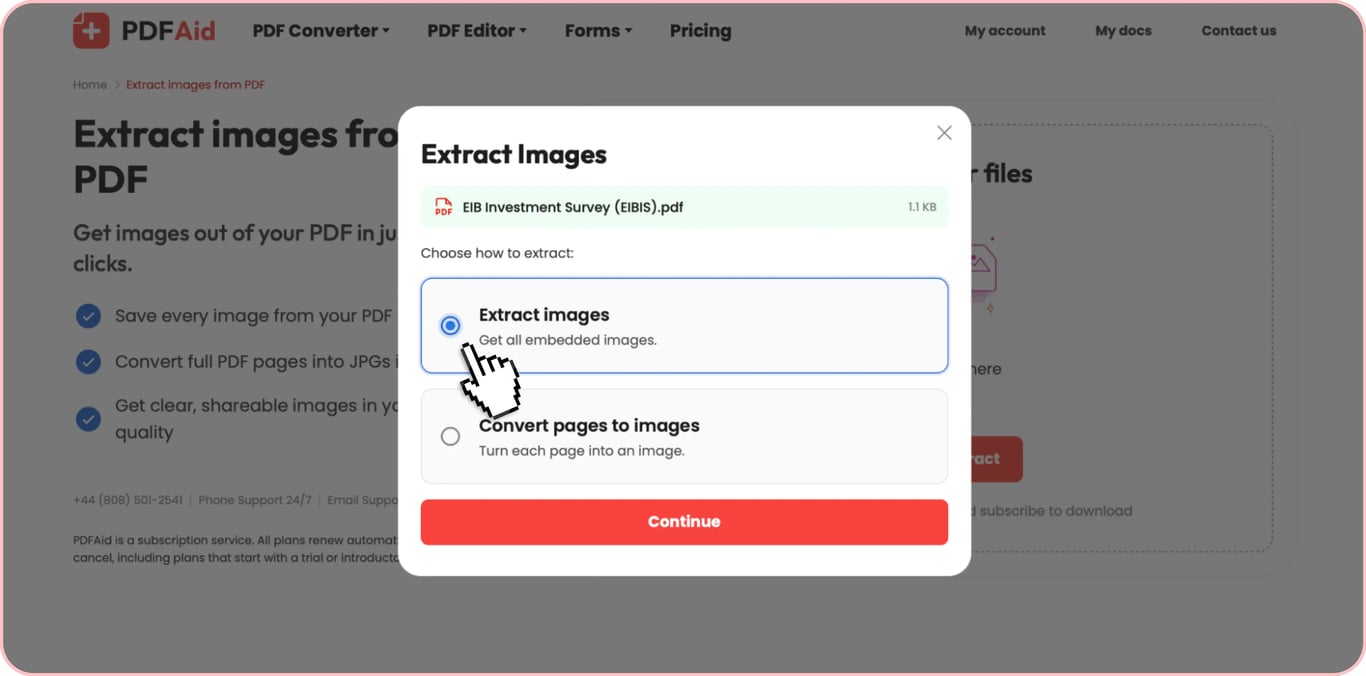
Wählen Sie aus, ob Sie Bilder extrahieren oder Seiten in JPG umwandeln möchten.
- 3
Wählen Sie die Bildqualität und laden Sie Ihre Bilder herunter.
Extrahieren Sie Bilder aus einem PDF in ihren Originalformaten, einschließlich JPG, PNG, TIFF, BMP oder GIF. Sie können diese Funktion sowohl auf Mobilgeräten als auch auf dem Desktop nutzen. Und das Wichtigste: Sie müssen keine zusätzliche Software installieren – das Tool funktioniert direkt im Browser.
So extrahieren Sie Bilder aus einem PDF
Extrahieren Sie Bilder aus jedem PDF-Dokument in drei einfachen Schritten:
Schritt 1: Laden Sie Ihr PDF hoch
Ziehen Sie Ihr PDF in den Upload-Bereich oder klicken Sie auf Hochladen, um Ihr PDF von Ihrem Gerät auszuwählen und die Bilder daraus zu extrahieren. Mit unserem Tool können Sie Bilder aus PDF-Dokumenten aller Art extrahieren, einschließlich Textdokumenten und gescannten Dateien.
Schritt 2: Extrahieren Sie die Bilder
Klicken Sie auf Bilder extrahieren. Unser Tool erkennt automatisch alle in der Datei eingebetteten Bilder – ohne manuelle Einstellungen.
Schritt 3: Laden Sie Ihre Bilder herunter
Nach der Verarbeitung zeigt Ihnen unser Tool die Gesamtzahl der erkannten Bilder an. Wählen Sie die gewünschte Qualität und laden Sie die Bilder herunter. Wenn es nur wenige Bilder sind, können Sie sie einzeln speichern oder alle Bilder auf einmal herunterladen.
Alle Bilder aus dem PDF auf einmal extrahieren
Je nach Dokumenttyp müssen Sie Bilder möglicherweise gesammelt aus einem PDF exportieren. Das kann zeitaufwendig sein, wenn Sie jedes in Ihrer Datei erkannte eingebettete Bild manuell herunterladen müssen.
Für solche Fälle unterstützt unser Tool den Stapeldownload von PDF-Bildern. Sie können alle Bilder aus einem PDF herunterladen; unser Tool packt sie in ein einziges ZIP-Archiv. Jedes Bild im Archiv bleibt hochauflösend und behält sein Originalformat. Diese Option ist besonders praktisch für PDFs, die Dutzende von Bildern enthalten.
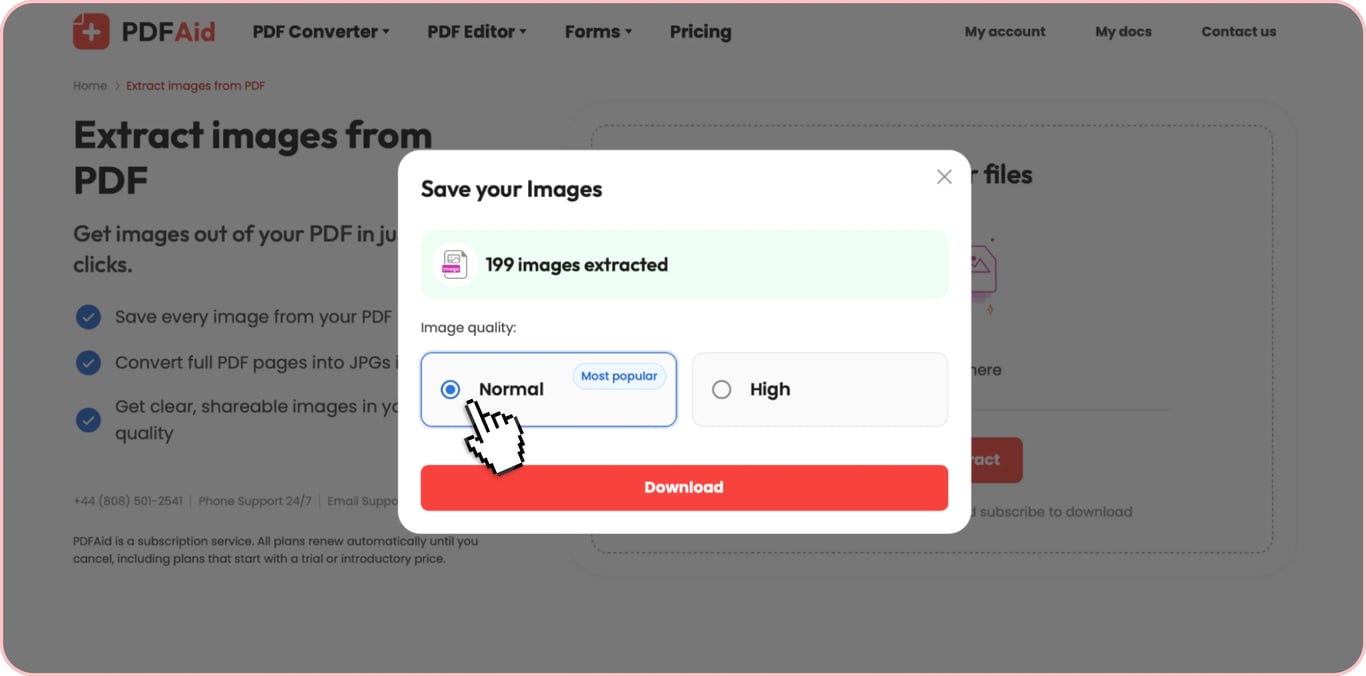
Bild aus PDF ohne Qualitätsverlust kopieren
Bei PDFs ohne Sicherheitsbeschränkungen können Sie Bilder direkt im PDF-Reader kopieren. Das klingt vielleicht nach einer einfachen Lösung. Sie müssen lediglich die benötigten Bilder in die Zwischenablage kopieren und in eine andere Datei oder E-Mail einfügen. Es gibt jedoch einen Haken: Bei passwortgeschützten Dokumenten ist das nicht möglich. Außerdem kopieren Sie beim Kopieren eines Bildes aus einem PDF nicht die Originaldatei, sondern ein vom PDF-Reader erstelltes Standard-Bitmapformat. Wenn Sie es dann in eine Zielanwendung (z. B. Microsoft Word) einfügen, wird das Bild möglicherweise zusätzlich komprimiert, um seine Größe zu verringern. Dies führt häufig zu schlechter Qualität und Unschärfe.
Unser PDF-Bildextraktor ermöglicht dagegen einen verlustfreien Prozess. Wenn Sie mit unserem Tool ein Foto in voller Qualität aus einem PDF extrahieren, entspricht die extrahierte Datei dem ursprünglich eingebetteten Bild, sodass Sie 100 % der ursprünglichen Auflösung ohne erneute Kodierung oder Komprimierung erhalten.
PDF-Bildextraktor – Formate, Datenschutz, keine Einschränkungen
Benötigen Sie weitere Gründe, unseren PDF-Bildextraktor zu verwenden? Hier sind vier Vorteile, die unser Tool auszeichnen:
Alle Formate: Unser Tool erkennt alle gängigen Bildtypen, einschließlich JPG/JPEG, PNG, TIFF, BMP und GIF, und extrahiert sie in ihrem Originalformat.
Sicherheit: Wenn Sie unseren Bildextraktor für PDFs verwenden, werden Ihre Dateien in einem privaten, zugriffsgeschützten Speicher aufbewahrt.
Praktisch und ohne Einschränkungen: Mit unserem Tool können Sie Bilder sofort online aus einem PDF extrahieren, ohne Software zu installieren – öffnen Sie einfach unsere Plattform im Browser und erledigen Sie die Aufgabe mit wenigen Klicks. Außerdem gibt es keine Beschränkungen hinsichtlich der Anzahl der Bilder, die Sie extrahieren können.
Über 50 Tools an einem Ort: Unsere Plattform bietet neben einem PDF-zu-Bild-Extraktor viele weitere Funktionen. Dazu gehören das Bearbeiten, Organisieren von Seiten, Signieren, Komprimieren und mehr. Darüber hinaus können Sie Dateien in PDF umwandeln und PDF-Dateien in andere Formate umwandeln oder unsere OCR-Funktion verwenden, um Text aus Bildern zu extrahieren.
 Es tut uns leid zu hören, dass Sie Ihr Abonnement kündigen möchten. Wenn Sie unseren Dienst nicht mehr benötigen, können Sie im Tab „Mitgliedschaft“ Ihres Kontos auf „Plan kündigen“ klicken. Sie können uns auch per Live-Chat kontaktieren, unter billing@pdfaid.com oder telefonisch unter +44 808 501 2541, um Hilfe bei der Kündigung Ihres Abonnements zu erhalten.