모든 도구에 무제한 액세스 가능


작동 방식은?
3단계로 간단히 PDF에서 이미지 추출하기:
- 1
PDF를 업로드하거나 드래그 앤 드롭하세요.
- 2
이미지 추출 또는 페이지를 JPG로 변환을 선택합니다.
- 3
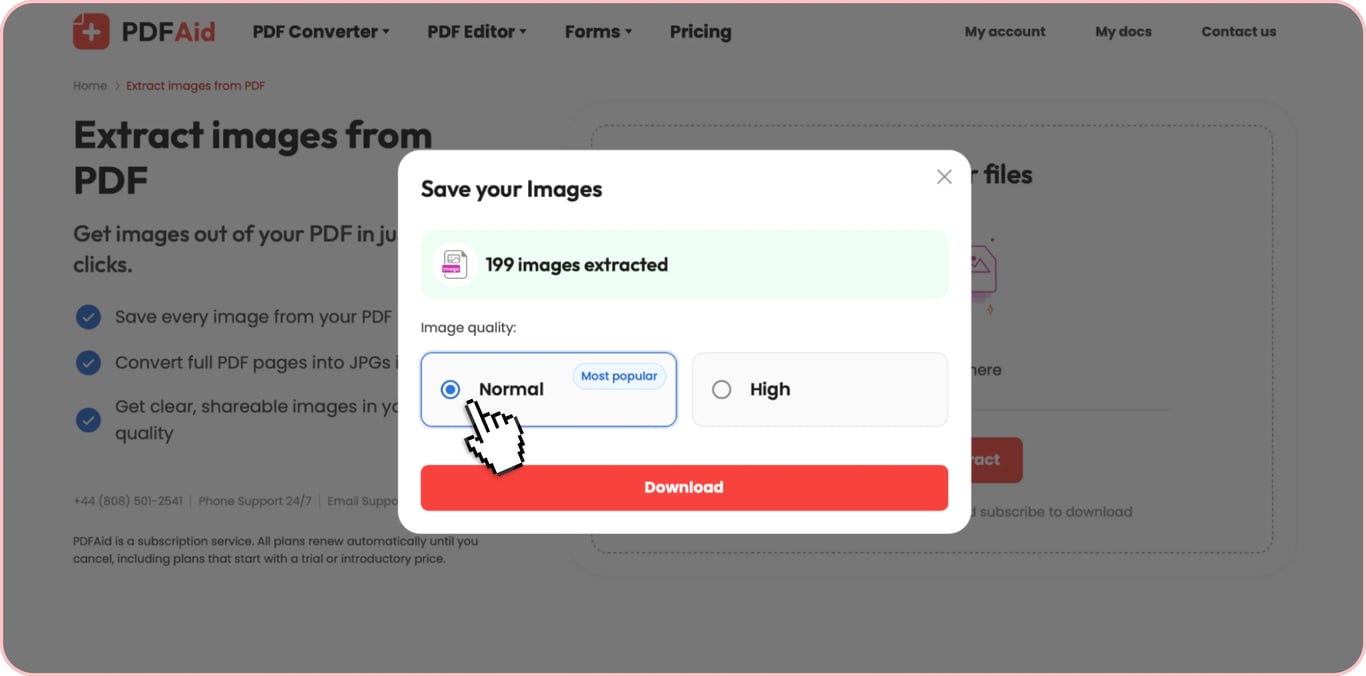
이미지 품질을 선택하고 이미지를 다운로드합니다.
JPG, PNG, TIFF, BMP, GIF를 비롯한 원본 형식으로 PDF에서 이미지를 추출합니다. 이 기능은 모바일과 데스크톱 모두에서 사용할 수 있으며, 무엇보다도 별도의 소프트웨어를 설치할 필요 없이 브라우저에서 바로 작동합니다.
PDF에서 이미지를 추출하는 방법
간단한 세 단계로 모든 PDF 문서에서 이미지를 추출합니다.
1단계: PDF 업로드
PDF를 업로드 영역에 끌어다 놓거나 '업로드'를 클릭하여 기기에서 파일을 선택하세요. 이 도구를 사용하면 텍스트 PDF와 스캔 PDF를 비롯한 모든 유형의 PDF 문서에서 이미지를 추출할 수 있습니다.
2단계: 이미지 추출
'이미지 추출'을 클릭하세요. 별도의 수동 설정 없이 도구가 파일에 포함된 모든 이미지를 자동으로 감지합니다.
3단계: 이미지 다운로드
파일 처리가 완료되면 도구에서 감지된 이미지의 총수를 표시합니다. 원하는 품질을 선택한 후 다운로드하세요. 이미지 수가 적으면 개별 이미지를 저장할 수 있고, 모든 이미지를 한 번에 다운로드할 수도 있습니다.
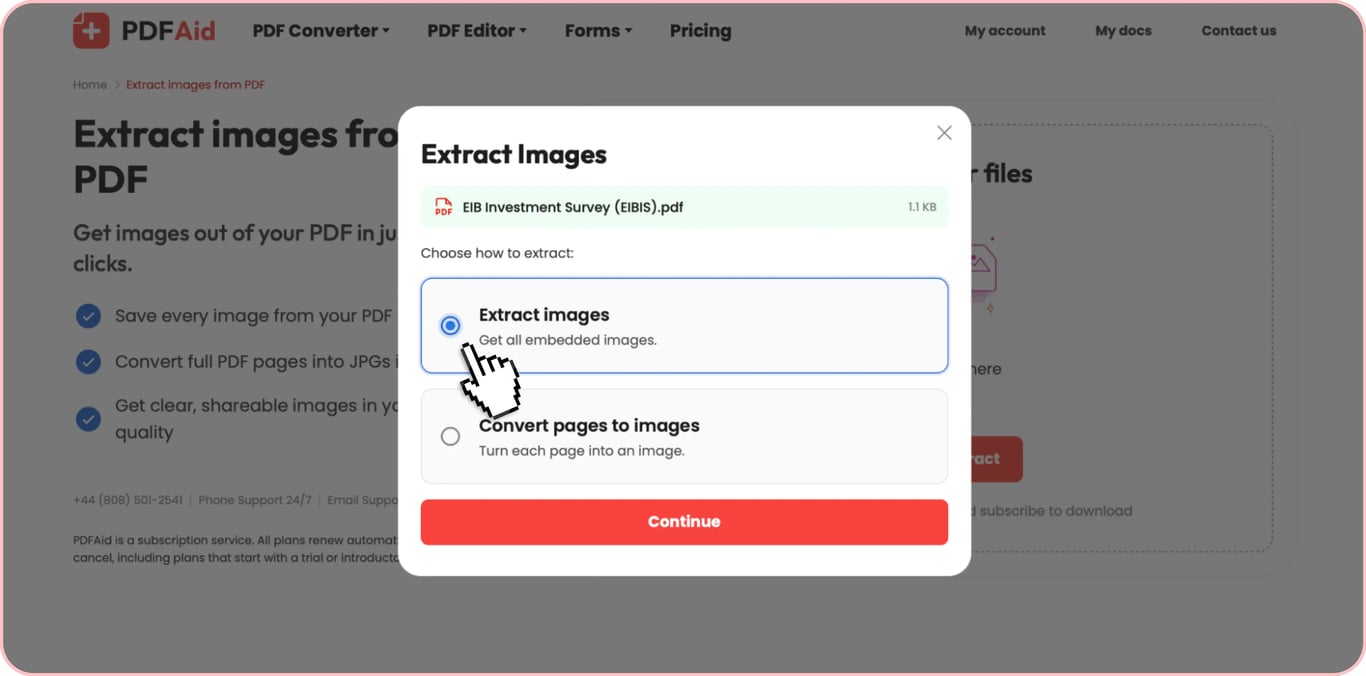
PDF의 모든 이미지를 한 번에 추출
문서 유형에 따라 PDF에서 이미지를 일괄 내보내야 할 수 있습니다. 파일에서 감지된 포함 이미지를 각각 수동으로 다운로드해야 한다면 시간이 오래 걸릴 수 있습니다.
이러한 경우에는 이 도구가 PDF 이미지 일괄 다운로드를 지원합니다. PDF의 모든 이미지를 한 번에 다운로드하도록 선택하면 이 도구가 모두 하나의 ZIP 압축 파일로 묶어 줍니다. 압축 파일 안의 각 이미지는 고해상도를 유지하고 원본 형식으로 보존됩니다. 이 옵션은 수십 개의 이미지가 포함된 PDF에 특히 편리합니다.
품질 손실 없이 PDF에서 이미지 복사
보안 제한이 없는 PDF에서는 PDF 리더에서 바로 이미지를 복사할 수 있습니다. 이 방법은 간편한 해결책처럼 보일 수 있습니다. 필요한 이미지를 클립보드에 복사한 후 다른 파일이나 이메일에 붙여 넣으면 되기 때문입니다. 하지만 비밀번호로 보호된 문서에서는 이 방법을 사용할 수 없습니다. 또한 PDF에서 이미지를 복사하면 원본 파일이 아니라 PDF 리더가 생성한 표준 비트맵 형식이 복사됩니다. 이후 대상 앱(예: Microsoft Word)에 붙여 넣으면 파일 크기를 줄이기 위해 이미지가 추가로 압축될 수 있습니다. 이로 인해 품질이 저하되고 이미지가 흐려지는 경우가 많습니다.
반면 PDF 이미지 추출기를 사용하면 품질 손실 없이 처리할 수 있습니다. 이 도구로 PDF에서 이미지를 원본 품질로 추출하면, 추출된 파일은 PDF에 포함된 원본 이미지이므로 재인코딩이나 압축 없이 해상도가 100%로 유지됩니다.
PDF 이미지 추출기 — 형식, 개인정보 보호, 제한 없음
PDF 이미지 추출기를 사용해야 하는 이유가 더 필요하신가요? 도구의 차별화된 네 가지 장점을 소개합니다:
모든 형식: 도구는 JPG/JPEG, PNG, TIFF, BMP, GIF를 비롯한 모든 일반적인 이미지 유형을 감지하고 원본 형식으로 추출할 수 있습니다.
보안: PDF 이미지 추출기를 사용하면 파일은 접근이 제어되는 비공개 저장소에 보관됩니다.
편리하고 제한 없음: 소프트웨어를 설치하지 않고도 온라인에서 PDF의 이미지를 즉시 추출할 수 있습니다. 브라우저에서 플랫폼을 열고 몇 번의 클릭만으로 작업을 완료하세요. 추출할 수 있는 이미지 수에도 제한이 없습니다.
한곳에서 이용하는 50개 이상의 도구: 플랫폼은 PDF 이미지 추출기 외에도 다양한 기능을 제공합니다. PDF 편집, 페이지 정리, 서명, 압축 등을 이용할 수 있습니다. 또한 파일을 PDF로 변환하거나 PDF를 다른 형식으로 변환할 수 있으며, OCR 기능으로 이미지에서 텍스트를 추출할 수도 있습니다.
 구독을 취소하시려는 점은 유감입니다. 더 이상 서비스를 이용할 필요가 없으신 경우 계정의 멤버십 탭에서 플랜 취소를 클릭하시면 됩니다. 또한 실시간 채팅, billing@pdfaid.com 또는 +44 808 501 2541로 문의하시면 구독 취소에 대한 도움을 받으실 수 있습니다.