모든 도구에 무제한 액세스 가능


작동 방식은?
3단계로 동일한 글꼴을 사용해 PDF 텍스트 편집하기:
- 1
PDF 파일을 업로드합니다.
- 2
변경하고 싶은 텍스트를 클릭한 다음 편집합니다.
- 3
편집된 PDF를 다운로드합니다.
PDF를 편집하면서 같은 글꼴을 유지하고 원본 레이아웃을 보존하세요. 새 텍스트는 주변 텍스트의 크기, 스타일, 간격을 자동으로 반영하므로 붙여 넣은 내용처럼 보이지 않고 문서의 일부처럼 자연스럽게 읽힙니다. 소프트웨어를 설치하지 않고 브라우저에서 PDF를 작업할 수 있습니다.
같은 글꼴로 PDF를 편집하는 방법
글꼴 일치 기능이 있는 PDF 편집기를 사용하는 방법은 다음과 같습니다.
1단계. PDF를 업로드 영역에 놓거나 ‘파일 업로드’ 버튼을 클릭하여 기기에서 선택하세요. 파일 크기는 100 MB 이하여야 합니다. 이 도구는 한 번에 하나의 문서만 처리할 수 있습니다.
2단계. ‘텍스트 편집’을 클릭한 다음 변경하려는 단어를 선택하세요. 필요한 경우 다른 크기를 선택하거나, 문구를 굵게 표시하거나, 중요한 정보에 밑줄을 긋거나, 다른 색상을 적용하여 텍스트 스타일을 업데이트할 수 있습니다. 문서에서 불필요하거나 잘못된 콘텐츠를 삭제하되, 실수한 경우에도 이 작업은 실행 취소할 수 없다는 점에 유의하시기 바랍니다.
3단계. 작성이 완료된 문서에서 나머지 콘텐츠를 변경하지 않고 단어, 날짜 또는 금액을 바꾸세요. 텍스트 크기, 현재 글꼴, 간격을 포함하여 단락의 원래 모양과 서식을 유지합니다.
4단계. 완료를 누르고 원하는 문서 형식을 선택한 다음, 편집된 PDF를 다운로드하거나 이메일로 보내세요. 저장된 파일에는 적용한 모든 변경 사항이 포함되며, 새 콘텐츠는 나머지 텍스트와 자연스럽게 어우러집니다.
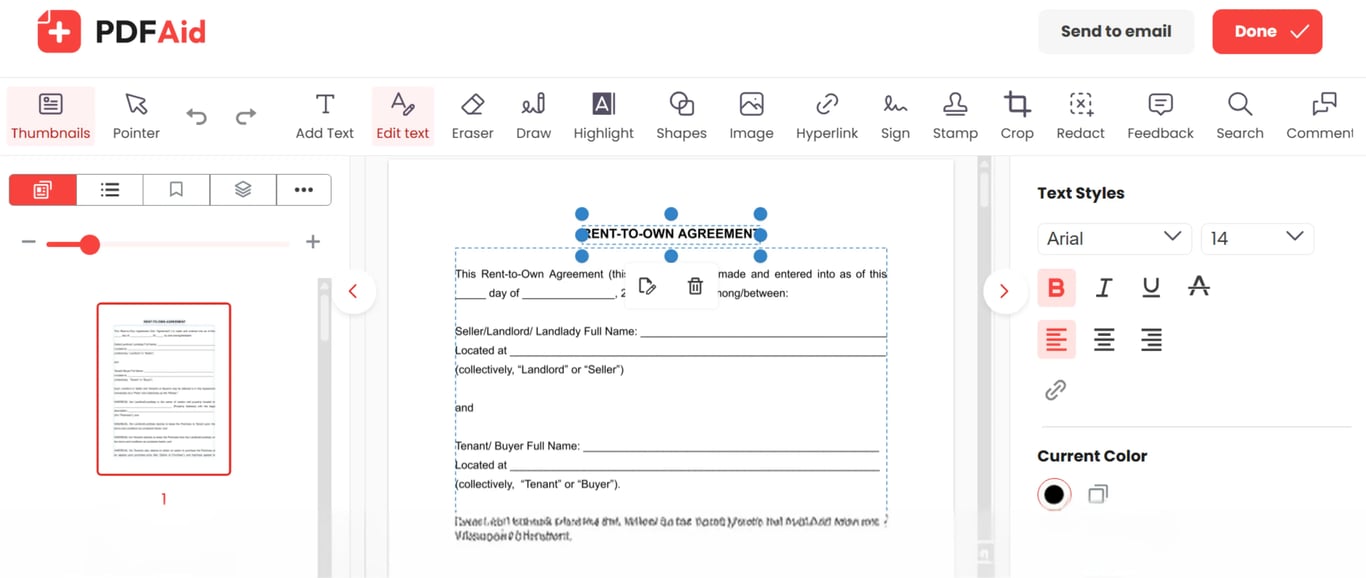
모든 기기에서 동일한 글꼴을 지원하는 PDF 편집기 — Windows, Mac, iPhone 또는 Android
이 도구는 브라우저에서 온라인으로 사용할 수 있으므로 앱을 설치할 필요가 없습니다. Mac, Windows 또는 Linux 컴퓨터나 휴대폰에서 열 수 있으며, 어떤 경우에도 편집기는 브라우저에서 실행됩니다. 업로드, 편집, 내보내기는 iPhone, iPad, Android 기기에서 동일한 방식으로 작동합니다.
문서가 원본 품질을 유지합니다
한 줄을 편집해도 글꼴 크기, 레이아웃, 이미지, 페이지 나누기는 모두 원래 위치에 그대로 유지됩니다. 바꾼 텍스트를 제외하면 파일은 이전과 똑같이 보입니다. 이 도구는 문서 구조에 영향을 주지 않으므로 PDF를 다시 작업할 필요가 없습니다.
파일은 비공개로 안전하게 유지됩니다
파일은 암호화된 연결을 통해 전송됩니다. 작성 가능한 양식, 계약서, 청구서 및 기타 모든 문서는 사용자만 접근할 수 있습니다. 다른 사람은 해당 문서를 열거나 보거나 편집할 수 없습니다.
 구독을 취소하려 하신다니 안타깝습니다. 더 이상 서비스가 필요하지 않으신 경우, 계정의 멤버십 탭에서 ‘플랜 취소’를 클릭하시면 됩니다. 실시간 채팅으로 문의하거나 billing@pdfaid.com으로 이메일을 보내거나 +44 808 501 2541로 전화하시면 구독 취소에 대한 도움을 받으실 수도 있습니다.