เข้าถึงเครื่องมือทั้งหมดของเราได้ไม่จำกัด


มีลักษณะการทำงานอย่างไร?
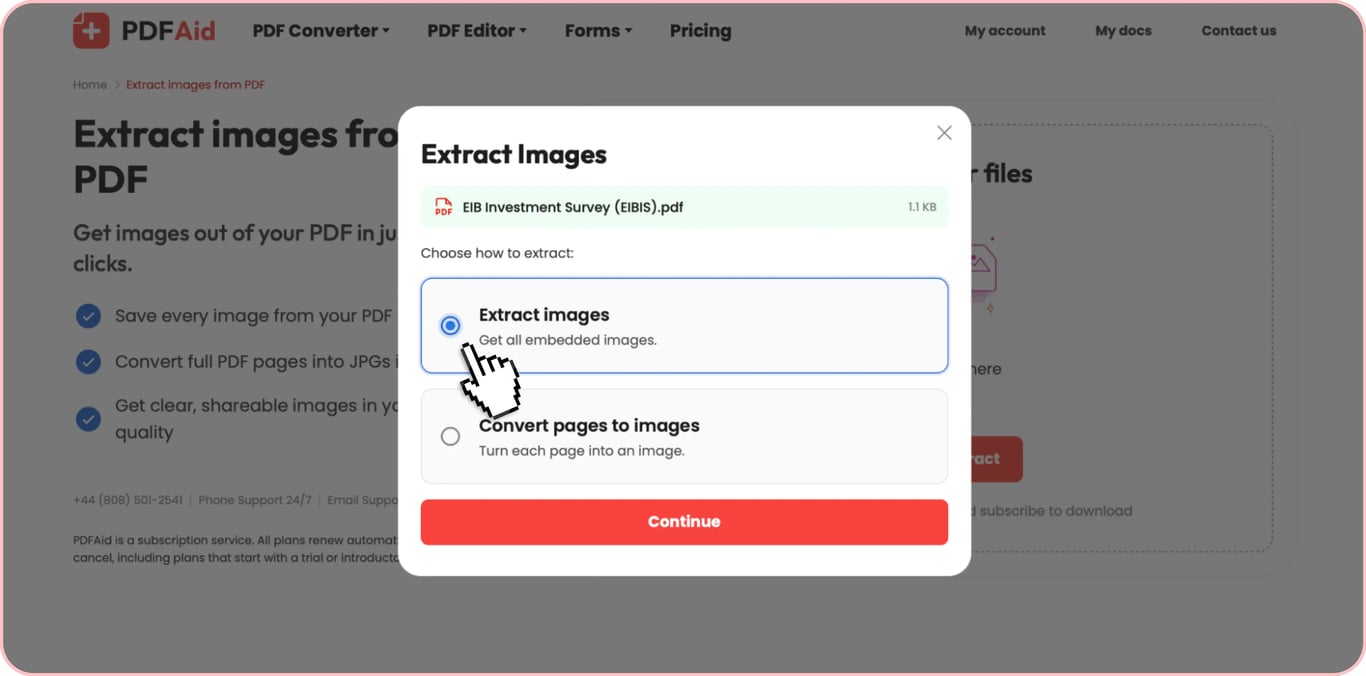
แยกรูปภาพออกจาก PDF ใน 3 ขั้นตอนง่าย ๆ:
- 1
อัปโหลดหรือวางไฟล์ PDF ของคุณด้วยการลากและวาง
- 2
เลือกว่าจะแยกรูปภาพหรือแปลงหน้าเป็น JPG
- 3
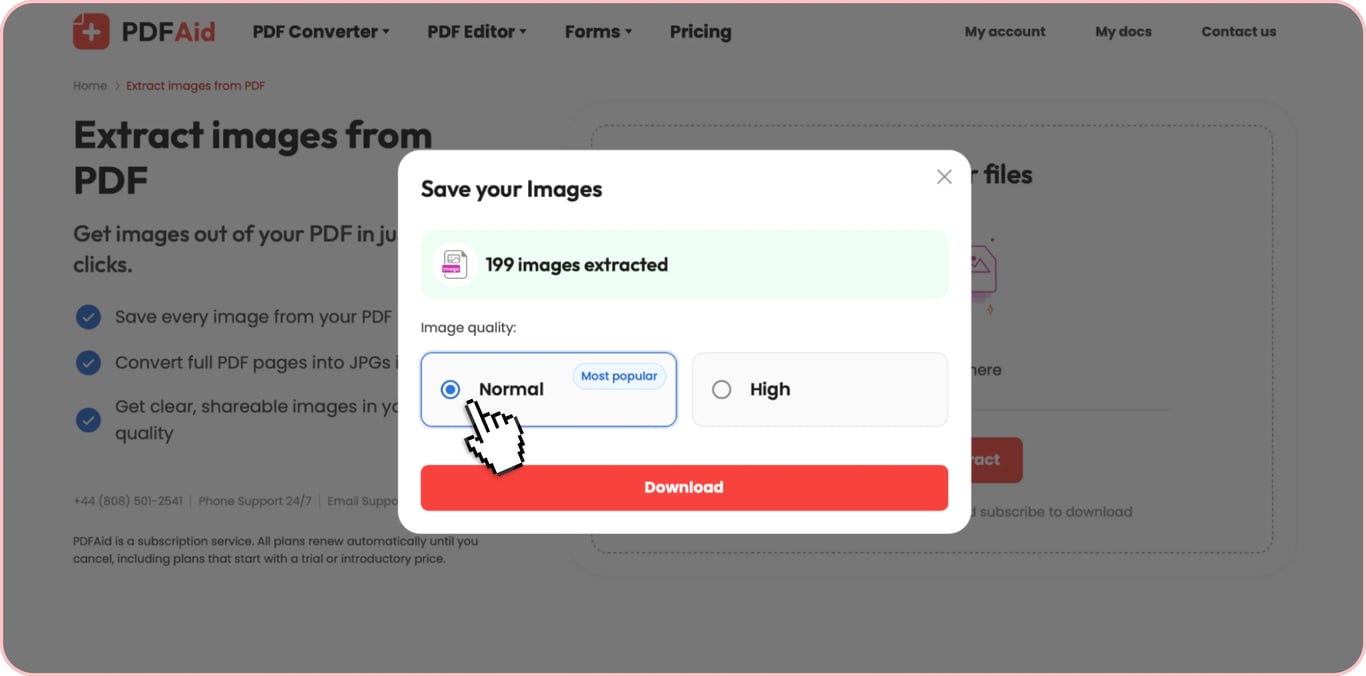
เลือกระดับคุณภาพรูปภาพและดาวน์โหลดรูปภาพของคุณ
แยกรูปภาพจาก PDF ในรูปแบบต้นฉบับ รวมถึง JPG, PNG, TIFF, BMP หรือ GIF คุณสามารถใช้คุณสมบัตินี้ได้ทั้งบนมือถือและเดสก์ท็อป และที่สำคัญที่สุดคือไม่ต้องติดตั้งซอฟต์แวร์เพิ่มเติม เพราะเครื่องมือทำงานได้โดยตรงจากเบราว์เซอร์
วิธีแยกรูปภาพจาก PDF
แยกรูปภาพจากเอกสาร PDF ใดก็ได้ในสามขั้นตอนง่ายๆ:
ขั้นตอนที่ 1: อัปโหลด PDF ของคุณ
ลาก PDF ของคุณไปวางในพื้นที่อัปโหลด หรือคลิก «อัปโหลดเพื่อแยกรูปภาพ» แล้วเลือกไฟล์จากอุปกรณ์ของคุณ เครื่องมือของเราช่วยให้คุณแยกรูปภาพจากเอกสาร PDF ได้ทุกประเภท รวมถึง PDF ที่มีข้อความและ PDF ที่สแกน
ขั้นตอนที่ 2: แยกรูปภาพ
คลิกแยกรูปภาพ เครื่องมือของเราจะตรวจหารูปภาพทั้งหมดที่ฝังอยู่ในไฟล์โดยอัตโนมัติ โดยไม่ต้องตั้งค่าเอง
ขั้นตอนที่ 3: ดาวน์โหลดรูปภาพของคุณ
หลังจากประมวลผลไฟล์แล้ว เครื่องมือของเราจะแสดงจำนวนรูปภาพที่ตรวจพบทั้งหมด เลือกคุณภาพที่ต้องการแล้วดาวน์โหลด คุณสามารถบันทึกรูปภาพแต่ละรูปได้หากมีเพียงไม่กี่รูป หรือดาวน์โหลดรูปภาพทั้งหมดพร้อมกันได้
แยกรูปภาพทั้งหมดจาก PDF พร้อมกัน
คุณอาจต้องส่งออกรูปภาพจาก PDF เป็นชุด ทั้งนี้ขึ้นอยู่กับประเภทเอกสาร การทำเช่นนี้อาจใช้เวลานานหากคุณต้องดาวน์โหลดรูปภาพที่ฝังอยู่แต่ละรูปที่ตรวจพบในไฟล์ด้วยตนเอง
สำหรับกรณีเช่นนี้ เครื่องมือของเรารองรับการดาวน์โหลดรูปภาพจาก PDF เป็นชุด คุณสามารถเลือกดาวน์โหลดรูปภาพทั้งหมดจาก PDF ได้ และเครื่องมือของเราจะรวมรูปภาพทั้งหมดไว้ในไฟล์ ZIP เดียว รูปภาพแต่ละรูปในไฟล์เก็บถาวรจะคงความละเอียดสูงและรูปแบบต้นฉบับไว้ ตัวเลือกนี้สะดวกเป็นพิเศษสำหรับ PDF ที่มีรูปภาพหลายสิบรูป
คัดลอกรูปภาพจาก PDF โดยไม่สูญเสียคุณภาพ
PDF ที่ไม่มีข้อจำกัดด้านความปลอดภัยช่วยให้คุณคัดลอกรูปภาพได้โดยตรงจากโปรแกรมอ่าน PDF วิธีนี้อาจฟังดูเป็นทางลัด เพียงคัดลอกรูปภาพที่ต้องการไปยังคลิปบอร์ด แล้ววางลงในไฟล์หรืออีเมลอื่น แต่มีข้อจำกัดอยู่ว่า คุณไม่สามารถทำเช่นนี้กับเอกสารที่ป้องกันด้วยรหัสผ่านได้ นอกจากนี้ เมื่อคุณคัดลอกรูปภาพจาก PDF คุณจะคัดลอกรูปแบบบิตแมปมาตรฐานที่โปรแกรมอ่าน PDF สร้างขึ้น ไม่ใช่ไฟล์ต้นฉบับ จากนั้นเมื่อคุณวางลงในแอปปลายทาง (เช่น Microsoft Word) แอปอาจบีบอัดรูปภาพเพิ่มเติมเพื่อลดขนาด ซึ่งมักทำให้คุณภาพลดลงและภาพเบลอ
ในทางกลับกัน การใช้เครื่องมือแยกรูปภาพจาก PDF ของเราช่วยให้กระบวนการไม่สูญเสียคุณภาพ เมื่อคุณแยกรูปภาพจาก PDF ด้วยเครื่องมือของเราที่คุณภาพสูงสุด ไฟล์ที่แยกออกมาคือรูปภาพต้นฉบับที่ฝังอยู่ จึงได้ความละเอียดเต็ม 100% โดยไม่มีการเข้ารหัสใหม่หรือการบีบอัด
เครื่องมือแยกรูปภาพจาก PDF — รูปแบบ ความเป็นส่วนตัว และไม่มีข้อจำกัด
ต้องการเหตุผลเพิ่มเติมในการใช้เครื่องมือแยกรูปภาพจาก PDF ของเราหรือไม่ ต่อไปนี้คือสี่สิ่งที่ทำให้เครื่องมือของเราโดดเด่น:
ทุกรูปแบบ: เครื่องมือของเราตรวจจับรูปภาพทั่วไปได้ทุกประเภท รวมถึง JPG/JPEG, PNG, TIFF, BMP และ GIF และแยกออกมาในรูปแบบต้นฉบับ
ความปลอดภัย: เมื่อคุณใช้เครื่องมือแยกรูปภาพจาก PDF ของเรา ไฟล์ของคุณจะถูกเก็บไว้ในพื้นที่จัดเก็บส่วนตัวที่ควบคุมการเข้าถึง
สะดวกและไม่มีข้อจำกัด: เครื่องมือของเราช่วยให้คุณแยกรูปภาพจาก PDF ออนไลน์ได้ทันทีโดยไม่ต้องติดตั้งซอฟต์แวร์ เพียงเปิดแพลตฟอร์มของเราในเบราว์เซอร์และดำเนินการให้เสร็จในไม่กี่คลิก เรายังไม่มีข้อจำกัดเกี่ยวกับจำนวนรูปภาพที่คุณสามารถแยกได้
50+ เครื่องมือในที่เดียว: แพลตฟอร์มของเรามีคุณสมบัติเพิ่มเติมมากมายนอกเหนือจากเครื่องมือแปลง PDF เป็นรูปภาพ ซึ่งรวมถึงการแก้ไข การจัดระเบียบหน้า การลงนาม การบีบอัด และอื่นๆ นอกจากนี้ คุณยังสามารถแปลงไฟล์เป็น PDF หรือแปลงจาก PDF เป็นรูปแบบอื่น หรือใช้คุณสมบัติ OCR ของเราเพื่อแยกข้อความจากรูปภาพได้
 เราขออภัยที่ทราบว่าคุณต้องการยกเลิกการสมัครใช้งาน หากคุณไม่ต้องการใช้บริการของเราอีกต่อไป คุณสามารถคลิก "Cancel plan" ในแท็บสมาชิกของบัญชีของคุณได้ นอกจากนี้ คุณยังสามารถติดต่อเราผ่านแชทสด ที่ billing@pdfaid.com หรือโทร +44 808 501 2541 เพื่อขอความช่วยเหลือในการยกเลิกการสมัครใช้งาน